SYMPTOM
A user wishes to modify the display of an attribute form coming from an MDX Cube in Strategy. For instance, an attribute form may hold a customer's credit card number, but the user would prefer to display only the last four digits in Strategy reports.
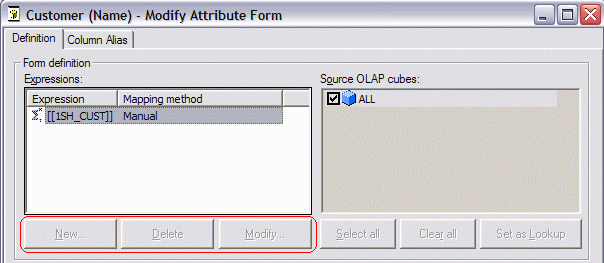
However, upon editing the attribute, there is no option to create new attribute form expressions or modify existing ones.
CAUSE
MDX Cube attribute forms other than ID and DESC are populated by "member properties" in the source cube. They are retrieved using the syntax illustrated below.
with set [dim0_select_members] as '{[SH_CUST CUST_HIER].[LEVEL03].members}'
select {[Measures].[46BYV2XCTRE8136S7A25U91ZS]} on columns,
non empty [dim0_select_members] dimension properties [SH_CUST].[1SH_CUST] on rows
from [QE_TUTO/TUTORIAL_ALL]
where ([SH_DATE].[01-APR-03])
cell properties CELL_ORDINAL, FORMATTED_VALUE, VALUE, FORMAT_STRING
The "dimension properties" clause does not allow custom expressions; only the reference to the property name is allowed. The MDX language does not provide syntax to evaluate custom expressions for attribute forms, and Strategy must operate within the capabilities of MDX.
ID and DESC forms are always retrieved implicitly in MDX with no additional syntax beyond the definition of the set of members from the attribute's level in its hierarchy. As with member properties, there is no MDX syntax to perform string manipulations on these forms.
ACTION
The cube's definition must be modified in the source database to make the desired display output available as a distinct member property. The specific procedure is different for each cube provider; consult the database's documentation for detailed instructions.
