EducationSoftwareStrategy.com
StrategyCommunity

Knowledge Base

Product

Community

Knowledge Base

TopicsBrowse ArticlesDeveloper Zone

Product

Download SoftwareProduct DocumentationSecurity Hub

Education

Tutorial VideosSolution GalleryEducation courses

Community

GuidelinesGrandmastersEvents
x_social-icon_white.svglinkedin_social-icon_white.svg
Strategy logoCommunity

© Strategy Inc. All Rights Reserved.

LegalTerms of UsePrivacy Policy
  1. Home
  2. Topics

KB205396: The Total Position Sort option is not available in MicroStrategy Web.


Community Admin

• Strategy


The Total Position Sort option is not available in MicroStrategy Web.

Summary

Description of a known issue regarding Grid Sort criterion applied on a Report Services Document in Strategy Web. Additional information is also provided as workaround.
 

Symptom

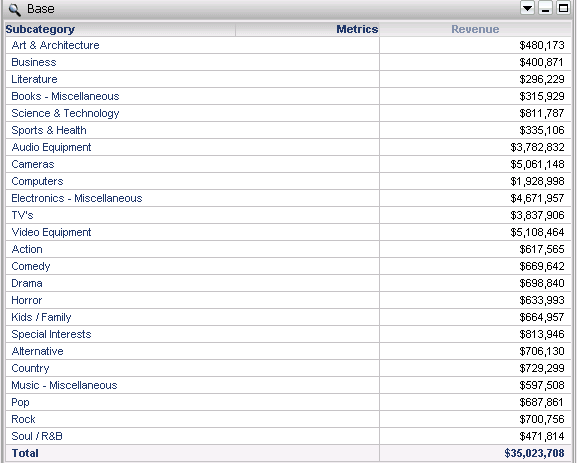
In Strategy Web, when selecting the Selector Total option, the Sort criterion on a grid inside the Report Services document is ignored:
ka04W000000OcehQAC_0EM4400000025wM.jpeg


Action

Strategy will continue to investigate and post updates as soon as they are available.
 

Workaround

In order to add all Total elements in the sorting, follow the steps below:
1) In Strategy Desktop, select one grid element
2) In the main menu, click on Data and select Advanced Sort
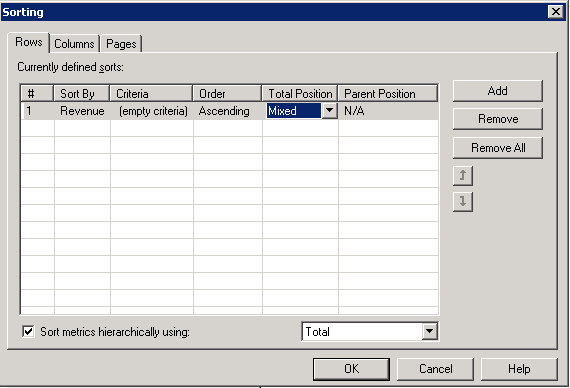
3) Under the Rows tab, add the object to be used for sorting criteria and define the Total Position column as Mixed, then select Mixed in the Total Position column.
ka04W000000OcehQAC_0EM4400000025wO.jpeg

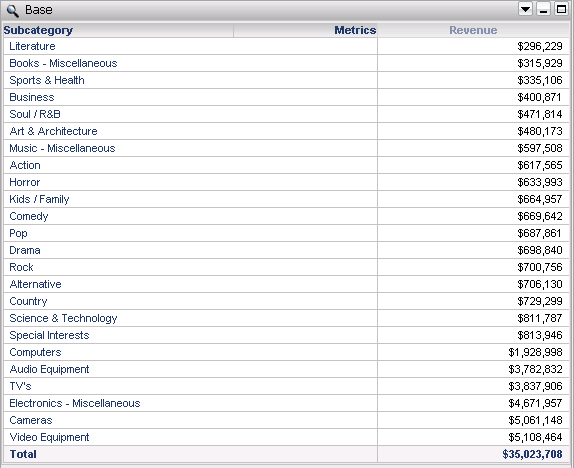
Now all elements are sorted correctly:
ka04W000000OcehQAC_0EM4400000025wL.jpeg


Comment

0 comments

Details

Knowledge Article

Published:

April 27, 2017

Last Updated:

July 17, 2017