SYMPTOM:
It is possible to sort attributes in a Visual Insight graph in Strategy Web 9.4.1 by clicking the dropdown arrow that appears when hovering over the attribute name, as shown below:
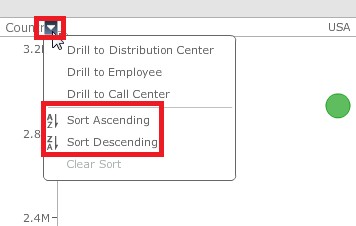
It is also possible to control if the Horizontal Axis attribute names are located on the top or bottom of the graph by dragging the grey arrow above or below the attribute name. The arrow is shown below:

However, when the arrow is above the attribute, making the attribute element names display on the bottom of the graph, it is not possible to sort using that attribute as the attribute name is not visible and no hover effect is possible, as shown below:

CAUSE:
This is a known issue in Visual Insight in Strategy Web 9.4.1.
ACTION:
This issue has been fixed in HTML5 Visual Insight in Strategy Web 10. Take advantage of upgrading for a fix. .
