EducationSoftwareStrategy.com
StrategyCommunity

Knowledge Base

Product

Community

Knowledge Base

TopicsBrowse ArticlesDeveloper Zone

Product

Download SoftwareProduct DocumentationSecurity Hub

Education

Tutorial VideosSolution GalleryEducation courses

Community

GuidelinesGrandmastersEvents
x_social-icon_white.svglinkedin_social-icon_white.svg
Strategy logoCommunity

© Strategy Inc. All Rights Reserved.

LegalTerms of UsePrivacy Policy
  1. Home
  2. Topics

KB20545: New governing subcategory under Project Configuration in MicroStrategy 9.x – Subscription Execution


Community Admin

• Strategy


New governing subcategory under Project Configuration in MicroStrategy 9.x – Subscription Execution

INTRODUCTION
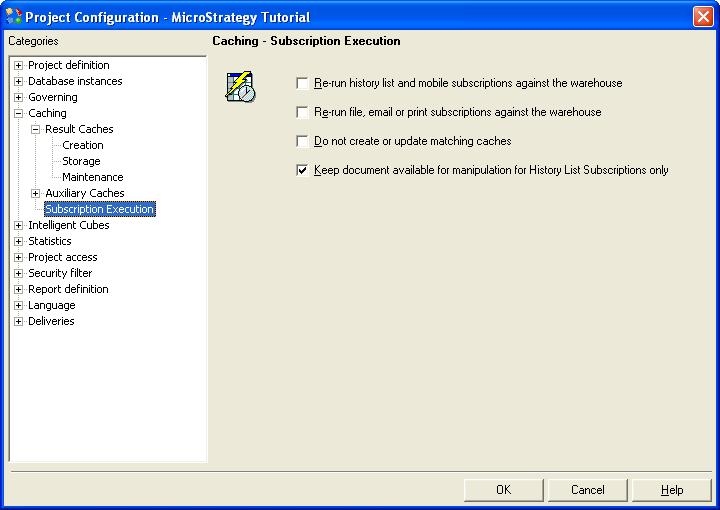
In Strategy 9.x, a new subcategory has been added to Project Configuration ->Caching called "Subscription Execution."
 
The Subscriptions Execution subcategory allows users to specify details for the automatic execution of a document or a report that is part of a subscription.
 
When the Subscription settings are not explicitly configured at design-time via Subscription Creation Wizard, these project level subscription settings are used.
 

ka04W000000Ogh1QAC_0EM440000002B87.jpeg

 
There are four settings under the Subscription Execution section. The benefit of having the project level subscription settings is that the administrator or the user need not worry about what the design-time settings were when the subscription instance was created or from which client the subscription was created. These settings guarantee a uniform run-time behavior for Subscriptions regardless of whether they are created from Strategy Web or Strategy Developer.
 

  1. Re-run history list and mobile subscriptions against the warehouse - Select this option to create caches or update existing caches when a report or document is executed and that report/document is subscribed to the History List folder or a mobile device.
  2. Re-run file, email or print subscriptions against the warehouse - Select this check box to create caches or update existing caches when a report or document is executed and that report/document is subscribed to a file, email, or print device.
  3. Do not create or update matching caches - If this check box is selected, caches will not be created or updated even if a warehouse execution occurs. If this check box is not selected, that means the user has explicitly configured to create or update caches when a warehouse execution occurs. Note that a cache will be created only if caching is enabled at the project level or at the report level through the Report Caching Options.
  4. Keep document available for manipulation for History List Subscription only - Select this check box to retain a document or report for later manipulation that was delivered to the History List folder.
    By default, this option is selected. This means all subscribed Report Services documents are available in the History List, regardless of their format. In other words, these documents can be run in HTML, PDF, or Excel formats directly from the History List. When this option is not selected, the document can only be executed from the history list in its scheduled format. For example, if the user subscribes to an Excel-formatted document, they can only open it in Excel format from the History List. In this case, the Details and PDF icons in the History List will not be available. In order to see this document in any other format, it must be re-executed.
     
    Note: Choosing to not keep the document available for manipulation (by clearing the check box), results in less memory load on the Intelligence Server.


Comment

0 comments

Details

Knowledge Article

Published:

June 13, 2017

Last Updated:

June 13, 2017