SUMMARY
This knowledge base article describes why Strategy Enterprise Manager report execution can fail with login errors when the user has warehouse authentication enabled.
SYMPTOM
When users execute Strategy Enterprise Manager reports, an error similar to the following is received:
Error: Dataset (xxx) execution failed:
 QueryEngine encountered error: Connect failed. Login failed.
Error type: Odbc error. Odbc operation attempted: SQLDriverConnect. [28000:18456: on SQLHANDLE] [Strategy][ODBC SQL Server Wire Protocol driver][SQL Server]
Login failed for user 'test'. Connection String: DSN=Cxxx_PRD_ST;UID=test;.. Error in Process method of Component: QueryEngineServer, Project Enterprise Manager,
Job 2713, Error Code= -2147212544.

CAUSE
One possible case is that the user has warehouse authentication enabled under User Editor > Authentication > Warehouse

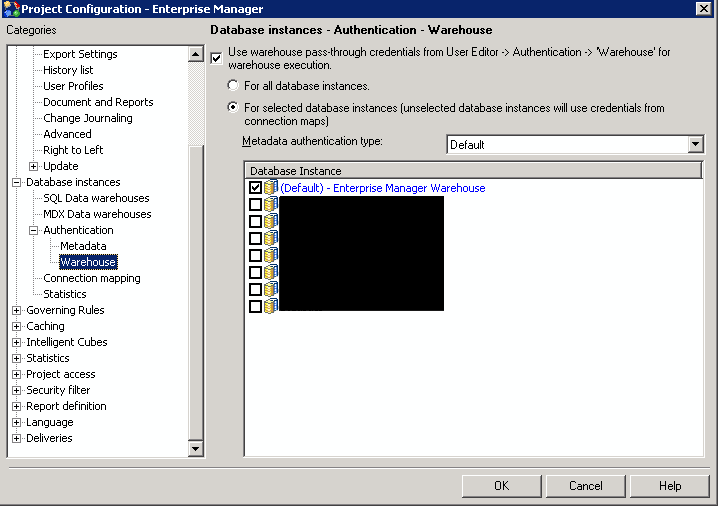
By default, use warehouse pass-through credentials is enabled for the default database instance under Project Configuration > Database instances > Authentication > Warehouse
ACTION
In the project configuration editor under Database instances > Authentication > Warehouse, deselect the "Use warehouse pass-through credentials from User Editor > Authentication > 'Warehouse' for warehouse execution."
