SUMMARY:
Description of a known issue identified upon migrating to Strategy 9.4.x where all hyperlinks based on Applysimple no longer work when exporting to Flash, generating a MHT file. Additionally, an action to be applied as workaround is suggested.
SYMPTOM:
After migrating to Strategy 9.4.x, the hyperlinks base on attribute form with Applysimple no longer work in the exported MHT file.
STEPS TO REPRODUCE:
1 - In the Strategy Tutorial project create a new attribute form in the Category attribute with the following expression:
ApplySimple("'<A HREF=''http://www.Strategy.com''>'�&'</A>'", [CATEGORY_DESC])

2 - Create a report with the Category attribute modified in the previous steps and the Revenue metric.
3 - Create a Document and select the newly created report as dataset.
4 - Run the document in Flash or Interactive View modes to confirm that the hyperlinks appear as expected.
6 - Export the document to a MHT file.
7 - Open the exported MHT file to confirm this issue.
CAUSE:
This is known issue in Strategy 9.4.x
ACTION:
Currently this issue is being reviewed by Strategy for a potential code fix on an upcoming Strategy release.
WORKAROUND:
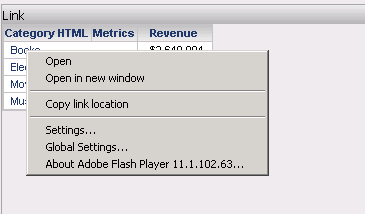
Click with the left or right mouse buttons on any element of the exported MHT file, and select either Open or Open in new window: