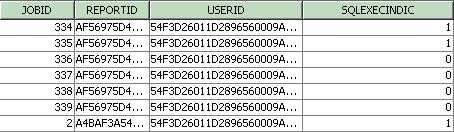
Starting with Strategy Enterprise Manager 9.0, a new column called 'SQLEXECINDIC' has been added to the statistics table IS_REPORT_STATS to indicate if SQL/MDX was actually executed against the warehouse or the OLAP cube source.
This column is also available in the fact table IS_REP_FACT as IS_SQL_EXEC_IND_ID. In the Enterprise Manager Project, this column is used for the indicator attribute 'SQL Execution Indicator'.
There are several cases in which report jobs are logged in the table IS_REPORT_STATS, but these jobs don't actually result in execution of SQL or MDX against the warehouse of the OLAP Cube Source. Some of those cases are:
Previously in 8.x, there was an indicator for cache creation in IS_REPORT_STATS, but there was no direct indicator for SQL execution. Also, in the IS_REP_FACT fact table, there were indicators for cache creation and cache hit, but these indicators are not applicable for element browse requests which result in SQL execution against the warehouse (when elements are not available in element cache or when element caching is disabled).
Using the SQL execution indicator, users can easily identify which report jobs resulted in execution against the database/cube data source and which report jobs did not. Sample data from IS_REPORT_STATS is shown below. The value of the indicator will be 1 for any job which results in SQL/MDX execution against the warehouse/MDX cube data source and the value will be 0 for all jobs which did not execute against the warehouse.