SYMPTOM
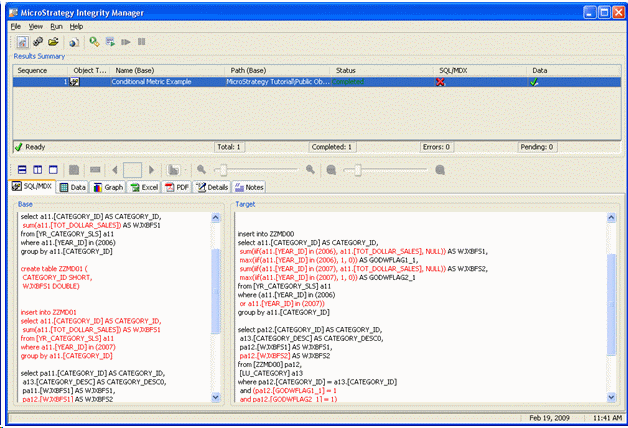
After upgrading an environment to Strategy 9.x, a project administrator runs Strategy Integrity Manager 9.x to identify differences in report behavior. Integrity Manager locates an unexpectedly large number of reports with different SQL, but the same results.
CAUSE
The most likely cause for the difference in SQL is the fact that Strategy 9.x has changed the default value of the "SQL Global Optimization" VLDB property.
Global Optimization is a SQL Generation Engine feature that analyzes similarities and relationships between SQL passes, to reduce the number of passes where possible and improve report execution time. It was introduced into Strategy 8.0.2, with two levels of optimization:
Strategy SQL Generation Engine 9.0 introduces two new levels of optimization:
Traditionally, when new VLDB properties or options are introduced, the old values are retained as defaults to avoid unexpected behavior changes. Performance testing of the new Global Optimization levels revealed significant performance improvements for reports where SQL passes are differentiated on the basis of the WHERE clause (generally reports with conditional metrics, although other report or metric designs may also fall in this category). These improvements were on the order of 30-70% for affected reports, well enough to justify a change in the default behavior.
Global Optimization is enabled at Level 4 by default, beginning with Strategy 9.0. The value is changed for the lowest-level default, and inherited by all database types.
ACTION
Strategy Integrity Manager results should be reviewed for changes in report data. If a report produces different SQL, but its results are still correct, this is likely to be the result of a deliberate change in product behavior. In any such cases, report execution times can improve noticeably, and the change is desirable.
If issues are encountered with Level 4 Global Optimization and it is desired to revert to a lower level, the "SQL Global Optimization" VLDB property may be changed for the project's warehouse database instance, or for specific reports if only a few are affected. However, changing the Global Optimization level solely for the sake of a clean Integrity Manager report would also sacrifice performance gains. Therefore, it is not recommended to take this action in the absence of functional report issues.
FURTHER READING
Refer to the Strategy 9 System Administration Guide (Admin.pdf), Appendix A: "SQL Generation and Data Processing: VLDB Properties" for more details on the behavior of the different levels of Global Optimization.
See also:
KB13505: New feature in Strategy SQL Generation Engine 8.0.2: Global Optimization
KB20579: How does the Global Optimization feature merge SQL passes with different WHERE clauses in Strategy SQL Generation Engine 9.0?
