EducationSoftwareStrategy.com
StrategyCommunity

Knowledge Base

Product

Community

Knowledge Base

TopicsBrowse ArticlesDeveloper Zone

Product

Download SoftwareProduct DocumentationSecurity Hub

Education

Tutorial VideosSolution GalleryEducation courses

Community

GuidelinesGrandmastersEvents
x_social-icon_white.svglinkedin_social-icon_white.svg
Strategy logoCommunity

© Strategy Inc. All Rights Reserved.

LegalTerms of UsePrivacy Policy
  1. Home
  2. Topics

KB20596: How to include the day of the week when a service is executed in the attachment name in MicroStrategy Narrowcast Server?


Community Admin

• Strategy


In Strategy Narrowcast Server 9.x the service execution date can be included in the name of an attachment by using the provided System Information Object. However, the day of the week when the service is executed cannot be added directly as there is no available System Information Object:
 

ka04W000000OeUaQAK_0EM440000002B8s.jpeg

In order to insert the service execution day of the week in the attachment name, the day can be queried using a grid report from the warehouse database server that the Strategy Intelligence Server 9.x project is using. This can be achieved as follows:
 

  • Create an attribute in the Strategy Intelligence Server 9.x project using only one ID form defined as follows:
ka04W000000OeUaQAK_0EM440000002B8u.jpeg
  • NOTE: This syntax is specific to Oracle. For other syntax specific to your database, contact the database administrator.


ka04W000000OeUaQAK_0EM440000002B8v.jpeg
  • NOTE: This attribute does not use any table in the warehouse, but you need to specify a lookup table for the attribute ID form. In this example, the 'LU_DAY' table has been used.


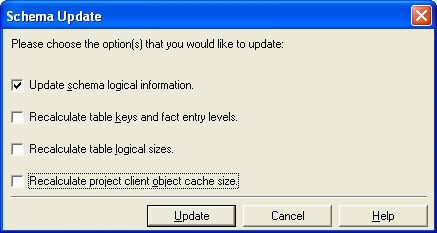
  • Update the project schema in Strategy Desktop 9.x by going to Schema menu -> Update Schema. Only the 'Update schema logical information' needs to be checked as shown:
ka04W000000OeUaQAK_0EM440000002B8m.jpeg
  • Create a report with just this attribute on the template. Upon executing this report, the weekday will be displayed as shown:
ka04W000000OeUaQAK_0EM440000002B8q.jpeg
  • The remaining steps for using the output of this grid report to include in the attachment name, via a Control Document in the Strategy Narrowcast Server 8.x service, are detailed in the following Strategy Knowledge Base technical note:
     

  • KB14281 (KB6200-80X-1504): How to use dynamic content from a grid report in a Control Document in Strategy Narrowcast Server 9.x

This technical note should be followed from step 3 in the 'Setting up the Strategy grid report' section.


Comment

0 comments

Details

Knowledge Article

Published:

June 9, 2017

Last Updated:

June 9, 2017