The handling of ragged and unbalanced hierarchies in Oracle Hyperion Essbase versions prior to Essbase 9.3 differs from that of other multidimensional cube providers. This has raised known issues with reporting against Essbase cubes with ragged and unbalanced hierarchies in Strategy. These issues are described in the following Strategy Knowledgebase documents.
Those issues are due to the assignment of level numbers to hierarchy members. Essbase versions prior to 9.3 would assign level numbers from the bottom of the hierarchy up; level 0 would consist of all of the leaf nodes (elements with no children), regardless of an element's actual depth within the hierarchy. Oracle Hyperion Essbase 9.3 returns ragged/unbalanced hierarchy data with level numbers assigned from the top, so that level 0 is always the root of the hierarchy tree and level 1 is the next level down. This is more in keeping with end-user expectations.
Strategy Engine is able to leverage these changes to improve support for ragged and unbalanced hierarchies.
Oracle Hyperion Essbase configuration
These changes were introduced into Oracle Hyperion Essbase 9.3.
Strategy connectivity to Essbase uses the XMLA standard, involving two components from Essbase: the database server and XMLA provider. Both the server and provider should be version 9.3 or higher, and the Strategy database instance should use the database connection type "Hyperion 9.3 APS and Essbase 9.3." Consult the following Strategy Knowledgebase document for details on the database connection types in Strategy for Oracle Hyperion Essbase.
If either the server or XMLA provider is an older version, the level numbers will be returned from the bottom up and the existing issues may be encountered.
The hierarchy definitions in Essbase should not specify named levels. Named levels can cause elements to be omitted from a particular level. For instance, in the Essbase ASOsamp cube where a named level has been defined for product group, querying the named level returns one element.

with set [dim0_select_members] as '{[Products].[ProdGroup].members}'
select {[Units]} on columns,
non empty [dim0_select_members] on rows
from [ASOsamp.Sample]
However, the Essbase-standard level number syntax returns all the expected elements.

with set [dim0_select_members] as '{[Products].Levels(2).members}'
select {[Units]} on columns,
non empty [dim0_select_members] on rows
from [ASOsamp.Sample]
If the Essbase cube does not define named levels, the attributes created in Strategy during cube import will use level number syntax in MDX queries. If named levels do exist, the named levels will be used instead, and query results for ragged/unbalanced hierarchies could be incorrect.
Note: Strategy uses MDX queries for element browsing against Essbase only, removing the need for named levels. (The other supported MDX data sources - SAP BI and Microsoft SQL Server Analysis Services - still use SCHEMA ROWSET calls for element browsing.)
Structure of unbalanced data in Strategy
In Strategy, if both the Essbase server and XMLA provider are version 9.3 or later, the hierarchy structure returned to Strategy is expected to match the hierarchical layout defined in Essbase. Strategy hierarchy prompts should allow end-users to browse through attribute elements as they would expect.
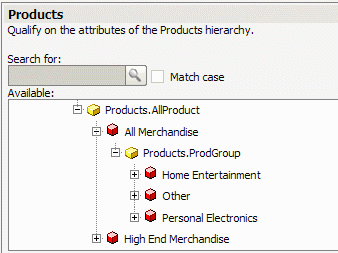
This structure also carries through to report data. Elements are likely to be shown with respect to their immediate parents and children. In the report display below, the children of All Merchandise are Home Entertainment, Other and Personal Electronics, exactly as shown in the hierarchy prompt.

In an unbalanced hierarchy, leaf nodes may appear in different columns, as in this report showing all the levels of the hierarchy. However, if a cube without named levels is imported, the attribute headers across the top would read Products.Levels(1), Products.Levels(2) and so on. This can be advantageous for ragged/unbalanced hierarchies because the attribute names imply nothing more than the levels of the tree.
Note: It is not yet known if the improvements in Strategy will produce the expected results in every ragged/unbalanced modeling scenario. The above report shows an unbalanced hierarchy, where branches of the hierarchical tree are at different depths and items at one depth may not be logically interchangeable. Ragged hierarchies, in which a level may be skipped in the middle of a branch, can potentially display correctly in reports. They pose serious problems for hierarchical browsing, specifically, how to navigate from one element to a grandchild if the immediate child does not exist. Strategy does not address this particular problem. Unbalanced hierarchies are likely to function better than ragged hierarchies in Strategy.
This distinction between ragged and unbalanced hierarchies follows the definitions of the terms given in the IBM DB2 Universal Database Info Center, DB2 Business Intelligence > DB2 Cube Views Version 8.2 > Managing metadata > Creating and modifying cube models > Hierarchies.
http://publib.boulder.ibm.com/infocenter/db2luw/v8/index.jsp?topic=/com.ibm.db2.udb.db2_olap.doc/cmdhierarchy.htm
