SYMPTOM
Users get the following error after installing Strategy Office and trying to access it through a MicroSoft Office program or the Strategy Office Configuration GUI from a client machine.

A connection to Web Services at http://<server name>/StrategyWS/MSTRWS.asmx could not be established: 'The request failed with HTTP status 403: Forbidden.'. Do you want to connect to a different Web Services URL?

CAUSE
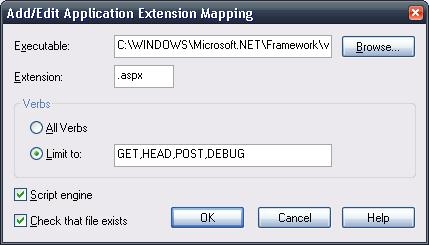
The StrategyWS virtual directory does not have the .aspx extension configured in the properties.
ACTION
Follow these instructions to resolve the issue.