SYMPTOM
In an environment where security filters are administered at the user level, a security filter is changed to alter the privileges assigned to a particular user. In this instance, the change will be to remove privileges for Strategy Office. The new security filter does not have any privileges relating to Office.
When logging on to Strategy Developer, the Administrator user receives an out of compliance warning message, and when running an audit in License Manager, it shows that the user is still inheriting the "Use Office" privilege from the previous security role:
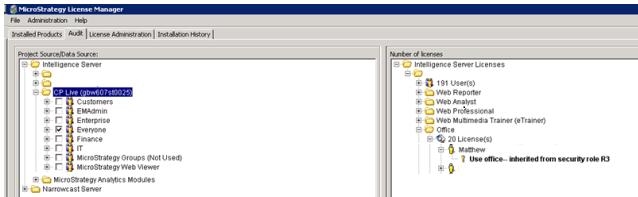
However, when checking the security role members for each project loaded in the project source, it does not show this user.
CAUSE
This issue occurs when a user is still linked to a previous security role in an unloaded project.
ACTION
Load the project and revoke the security role from the user in question.
KB206392
