Starting with the release of Strategy ONE (March 2024), dossiers are also known as dashboards.
Strategy 9.4.1 supports automatic generation of latitude and longitude (geocoding) for geographical attributes when using Data Import in Strategy Web. Data Import supports automatic geocoding for United States zip codes. However, when importing five digit zip codes with leading zeros these will not be automatically geocoded.
Strategy Web 9.4.1 users importing zip code data that contains leading zeros will notice that those attribute elements will not be automatically geocoded. For example, in the data below entry with ID "1" will be not be geocoded whereas entry with ID "2" will be geocoded correctly:
Yes | Yes |
Yes | Yes |
Yes | Yes |
This will result in just 1 point showing in a map configured with this data as a source.
View the image below for reference:
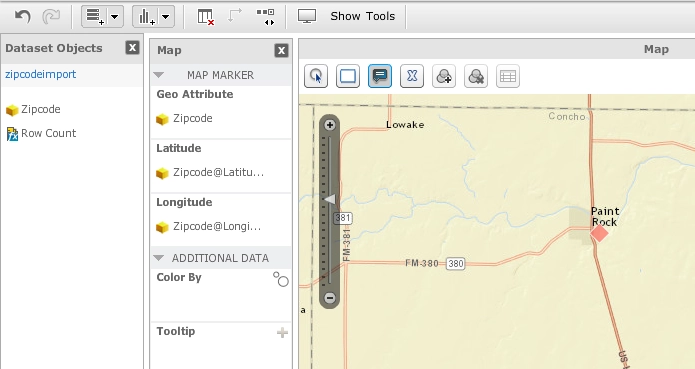
With Strategy 9.4.1, Data Import geocoding is done by the Intelligence Server based on a predefined lookup table available in CSV format. This table contains a list of all the US Zip Codes without leading zeros, therefore, all imported files with leading zeros will fail the exact match test and will not be geocoded. For example, in the example above the zip code exists in the lookup table as "8802" and not "08802".
This has been logged as a known issue with Strategy 9.4.1 since the official standard determines that all zip codes should comprise of five digit codes. Strategy will continue to investigate and post updates as soon as they are available. Please refer back to this article for updates.
In the meantime, there are two possible workarounds:
a. Modify the imported data to match the Strategy lookup table :
Leading zeros can be removed from the imported excel file with the following formula:
=VALUE(A1)
C:\Program Files (x86)\MicroStrategy\Intelligence Server\ZipCode.csv
Interested in learning more about Dossier authoring? Visit the Learning Center on Community!
Or go to our Documentation pages for more product information.
