Starting with Strategy Enterprise Manager 9.0, it is possible to track export jobs initiated from Strategy Web.
A new column called 'EXPORTINDIC' has been added to the Statistics tables IS_REPORT_STATS and IS_DOCUMENT_STATS (or STG_IS_REPORT_STATS and STG_IS_DOCUMENT_STATS for current data, not loaded yet) to mark report/document jobs that were triggered because of exports done from Strategy Web. This column is available in the IS_REPORT_STATS and IS_DOCUMENT_STATS tables (or STG_IS_REPORT_STATS and STG_IS_DOCUMENT_STATS for current data, not loaded yet) for Statistics tables in Strategy 9.0 or above.
Note: Exports from Strategy Desktop cannot be tracked as the export operation is performed by the client i.e. Strategy Desktop and not the Strategy Intelligence Server.
For exports initiated from Strategy Web, a non-zero value is logged in the EXPORTINDIC column as shown below. The value is 0 for jobs which are not for export operations.

The value in the EXPORTINDIC column indicates the type of export that was done. The following table provides the type of export corresponding to each value.
|
|
|
|
|
|
|
|
|
|
|
|
Reports:
All report export operations performed from Strategy Web i.e. exports done after report execution and exports done from history list messages and direct exports can be tracked.
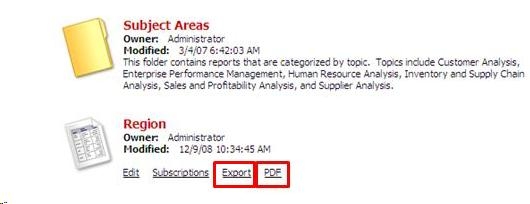
Direct export refers to the export operations which are done prior to the execution of the report or document i.e. users click on the 'PDF' or 'Export' button seen next to the report name, as shown below:
Even in cases, where Strategy Web report export jobs use existing report caches, a report job gets logged in the IS_REPORT_STATS table (or STG_IS_REPORT_STATS for current data) with a non-zero value for the export indicator.
Documents:
For documents, only the document export jobs which don't use an existing document cache have a non-zero value for the EXPORTINDIC column.
Consider the following scenario: If there is no existing document cache and a direct export of a document is done to PDF, then the EXPORTINDIC column for this document job has a value of 2 (row 1 in the screenshot below). If an export of the same document is done to Excel, then the EXPORTINDIC column for this document job has a value of 1 (row 2 in the screenshot below). If the same document is exported to PDF again, there is an entry in the IS_DOCUMENT_STATS table (or STG_IS_DOCUMENT_STATS for current data), but the EXPORTINDIC column value for this row is 0 as shown below.

This is because there is an existing PDF document cache which was used by the 2nd PDF execution. For more information about document caching, refer to the following knowledge base document.
KB20538 (KB5300-9X-0009): New Feature in Strategy 9 - Report Services Document Caching
Export jobs initiated after executing the document or exports initiated from history list messages don't get logged to IS_DOCUMENT_STATS. This is because no Strategy Intelligence Server Job gets created (because of work flow for Web operations) for this operation and hence no data gets logged to (STG_)IS_DOCUMENT_STATS.
