SYMPTOM
The Multisource reporting feature in Strategy SQL Generation Engine allows a single Strategy report to combine data from multiple warehouses.
In reports using multiple database instances, if there are Report Pre or Post Statement VLDB Properties configured to execute SQL before or after data processing, users may notice that these statements are taken from the project's primary warehouse database instance. Some reports may not require tables from the primary warehouse at all, but the primary warehouse Report Pre and Post Statement VLDB Properties are sent regardless of that fact.
For example, in the Strategy Tutorial project, an attribute and a metric may be defined against the Operational Datamart database. With report pre-statements defined in both the Operational Datamart and Tutorial Data database instances, the report SQL opens a connection to Tutorial Data to run the primary warehouse pre-statement, and then executes SQL against Operational Datamart without running the pre-statement from that database instance.
Operational Datamart Report Pre Statement 1
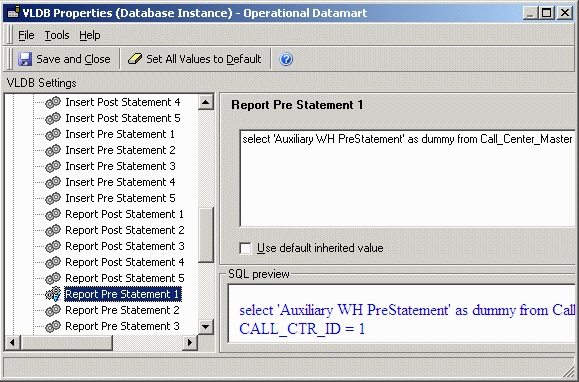
Tutorial Data Report Pre Statement 1

Report SQL
[DB Instance: Tutorial Data]
select 'Main WH PreStatement' as dummy from lu_year where year_id = 2006
[DB Instance: Operational Datamart]
select a11.[Activity_ID] AS Activity_ID,
sum(datediff('n', a11.[BEGIN_CALL], a11.[END_CALL])) AS WJXBFS1
from [Call_Center_Activity] a11
group by a11.[Activity_ID]
CAUSE
This behavior occurs because, in the current Strategy SQL Generation Engine design, only one set of Report Pre and Post Statements may be issued per report, whether or not the report uses only one database instance. Pre-statements are inserted into report SQL before evaluating the required SQL passes, so the statements are chosen regardless of report objects. The primary warehouse database instance is selected by default.
The same logic applies to the Element Browsing Pre and Post Statement VLDB Properties, introduced into Strategy SQL Generation Engine. For more details on the element browsing properties, consult the following Strategy Knowledgebase article.
KB20709: New feature in Strategy SQL Generation Engine: Element Browsing Pre- and Post-SQL Statement VLDB Properties
IMPORTANT: If Report Pre and Post Statements are defined in report or template level VLDB Properties, these will override the settings in database instances. In such a case, Report Pre and Post Statements from all database instances will be ignored. Since the report or template is not associated with a specific database instance, the primary warehouse database instance will be assumed for the report-level settings. The override is per VLDB Property; a report may take Report Pre Statement 1 from report level and Report Pre Statement 2 from the database instance.
ACTION
This issue is logged for review by the Strategy Technology department.
WORKAROUND
If it is necessary to apply different connection parameters to different warehouses using Pre Statement VLDB Properties, it is possible to use the Table Pre Statement VLDB Properties instead. Where a report can use more than one database instance, an intermediate table may be created in only one database, and the VLDB Properties for that SQL pass are taken from the database instance running the pass.
In Strategy SQL Generation Engine, no workaround is available to apply different Element Browsing Pre and Post Statements to different database instances.
