SYMPTOM:
It is possible to configure a Mobile configuration to clear the application of saved passwords once every set period, in either hours or days, as shown below:
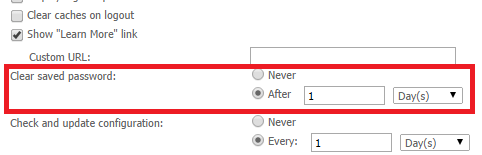
However, with this setting enabled when using Windows authentication to authenticate users to the Mobile Server, users are continually reprompted to authenticate after document or report executions in Strategy Mobile 9.4.1 Update 4 when using iOS 8.
CAUSE:
This is an issue in Apple's iOS 8. When logging into a server, a challenge is sent to the client. Strategy will then use the credentials in the device to answer the challenge. When the challenge fails, a counter for failed challenges in the iOS will increase. This is used by Strategy to determine if the challenge should be canceled or not. In iOS 8, this counter increases even when no failures have happened, triggering the mechanism in the Strategy Mobile 9.4.1 iOS Update 4 to clear the password during the execution of the report or document. This issue is specific to the Strategy Mobile 9.4.1 iOS Update 4 app because it is the first one to support iOS 8.
ACTION:
Contact Strategy Technical Support for an update on this issue.
WORKAROUND:
Set the setting "Clear saved password" to "Never".
The Strategy Internal Reference Number for the issue discussed in this technical note is 975746.
