EducationSoftwareStrategy.com
StrategyCommunity

Knowledge Base

Product

Community

Knowledge Base

TopicsBrowse ArticlesDeveloper Zone

Product

Download SoftwareProduct DocumentationSecurity Hub

Education

Tutorial VideosSolution GalleryEducation courses

Community

GuidelinesGrandmastersEvents
x_social-icon_white.svglinkedin_social-icon_white.svg
Strategy logoCommunity

© Strategy Inc. All Rights Reserved.

LegalTerms of UsePrivacy Policy
  1. Home
  2. Topics

KB20755: Attributes used in object prompts cannot be deleted due to a dependency with a report even after the attribute has been removed from the object prompt's predefined list of objects in MicroStrategy Developer 9.X


Stefan Zepeda

Salesforce Solutions Architect • Strategy


Attributes cannot be deleted from a project after being used in an object prompt and saved as the default prompt answer in a report even after the attribute has been removed from the pre-defined list of objects in the object prompt.

SYMPTOM
Attributes cannot be deleted from a project after being used in an object prompt and saved as the default prompt answer in a report even after the attribute has been removed from the pre-defined list of objects in the object prompt.
 
STEPS TO REPRODUCE
Follow the next steps to reproduce this issue in Strategy Tutorial 9.X
 

  • In Strategy Desktop 9.X, create a new object prompt
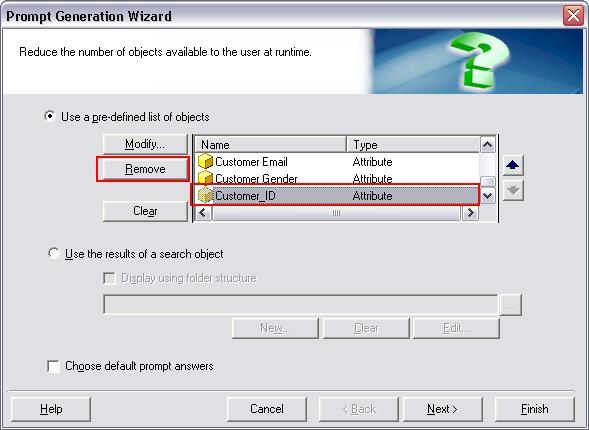
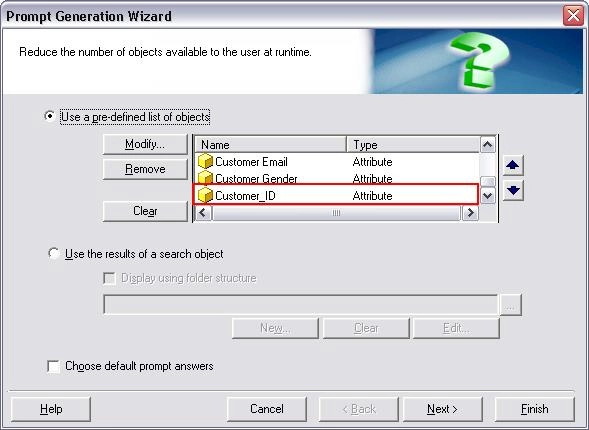
  • Select to reduce the number of objects available to the user at runtime by using a pre-defined list of objects and include the attribute Customer_ID in the list as shown in the image below.
ka02R000000kXtDQAU_0EM440000002EZB.jpeg
  • Create a new report containing the object prompt created in step 2
  • Run the report once and select the attribute Customer_ID from the object prompt as shown below
ka02R000000kXtDQAU_0EM440000002EZD.jpeg
  • After the report is executed, save the report and choose to save as Prompted and Set the current prompt answers to be the default prompt answers as shown in the image below
ka02R000000kXtDQAU_0EM440000002EZf.jpeg
  • Edit the object prompt created in Step 2 and remove the attribute Customer_ID from the pre-defined list of objects .
ka02R000000kXtDQAU_0EM440000002EZd.jpeg
  • Attempt to delete the attribute Customer_Id, the following message will appear
ka02R000000kXtDQAU_0EM440000002EZF.jpeg
  •  
    'Customer_ID' cannot be deleted because the definition of one or more application objects depend on it. Do you want to see a list of these objects?
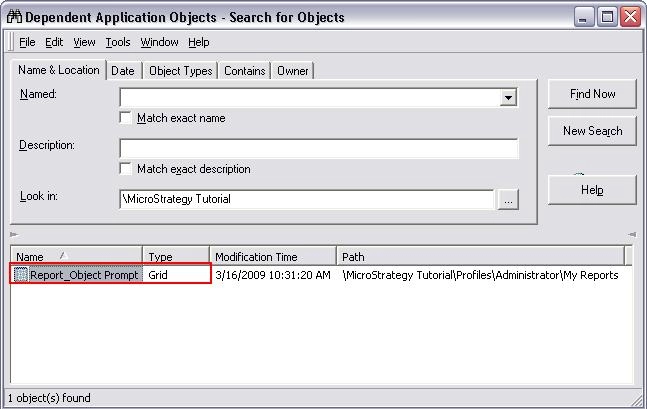
  • The list of dependents will include the report created in step 3 even though the attribute is not directly included in the template
ka02R000000kXtDQAU_0EM440000002EZC.jpeg

CAUSE
This is a known issue for Strategy 9.X
 
WORKAROUND
Run the dependent report once selecting a different prompt answer and re-save the report.
 
ACTION
Strategy will continue to investigate and post updates as soon as they are available.


Comment

0 comments

Details

Knowledge Article

Published:

June 13, 2017

Last Updated:

June 13, 2017