EducationSoftwareStrategy.com
StrategyCommunity

Knowledge Base

Product

Community

Knowledge Base

TopicsBrowse ArticlesDeveloper Zone

Product

Download SoftwareProduct DocumentationSecurity Hub

Education

Tutorial VideosSolution GalleryEducation courses

Community

GuidelinesGrandmastersEvents
x_social-icon_white.svglinkedin_social-icon_white.svg
Strategy logoCommunity

© Strategy Inc. All Rights Reserved.

LegalTerms of UsePrivacy Policy
  1. Home
  2. Topics

KB20767: How to configure a proxy server configuration in MicroStrategy Office 9.x.


Community Admin

• Strategy


How to configure a proxy server configuration in MicroStrategy Office 9.x.

In Strategy Office 9 the user is able to configure the proxy server configuration that is going to be use by Strategy Office. In previous versions the Strategy Office client will load the default system proxy configuration.
 
Follow these steps to configure a proxy server in Strategy Office 9:
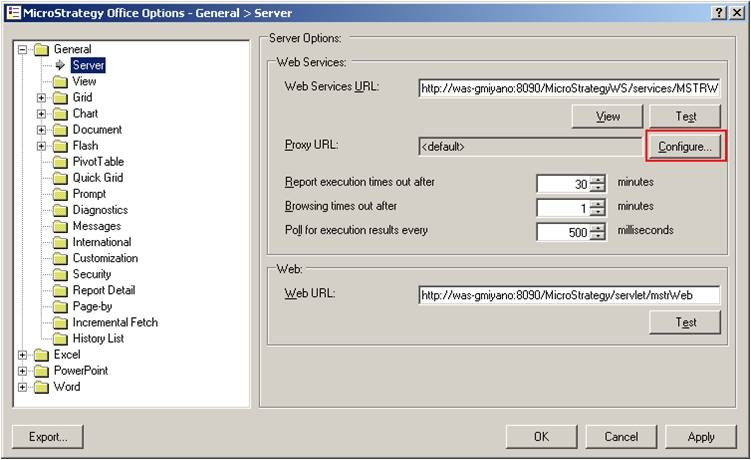
 

  • Open the Strategy Office Options window.
  • Under General - > Servers click on the "Configure" button for proxy URL.
ka04W000000Ocv5QAC_0EM4400000028Od.jpeg
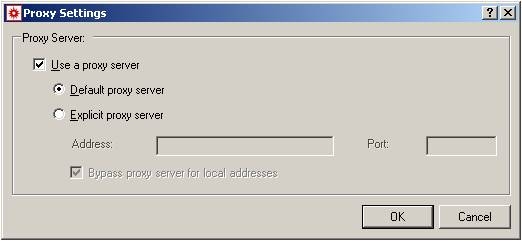
  • That will open the proxy setting window.
ka04W000000Ocv5QAC_0EM4400000028Ob.jpeg
  • In that window a user can configure the proxy connection information to use in Strategy Office.

Comment

0 comments

Details

Knowledge Article

Published:

June 24, 2017

Last Updated:

June 24, 2017