EducationSoftwareStrategy.com
StrategyCommunity

Knowledge Base

Product

Community

Knowledge Base

TopicsBrowse ArticlesDeveloper Zone

Product

Download SoftwareProduct DocumentationSecurity Hub

Education

Tutorial VideosSolution GalleryEducation courses

Community

GuidelinesGrandmastersEvents
x_social-icon_white.svglinkedin_social-icon_white.svg
Strategy logoCommunity

© Strategy Inc. All Rights Reserved.

LegalTerms of UsePrivacy Policy
  1. Home
  2. Topics

KB20805: A MicroStrategy Narrowcast Server 9.x - 10.x system reports its status as running while the MicroStrategy Narrowcast Administrator status bar reports the status as not running


Community Admin

• Strategy


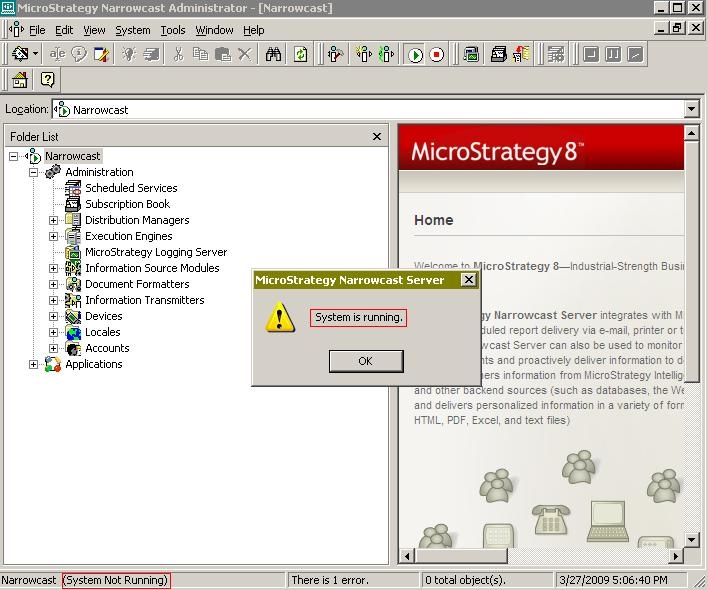
A MicroStrategy Narrowcast Server 9.x - 10.x system reports its status as running while the MicroStrategy Narrowcast Administrator status bar reports that a MicroStrategy Narrowcast Server 9.x - 10.x system is not running. However, when clicking on the start system button, a message reporting 'System is running' appears.

SYMPTOM:
 
A Strategy Narrowcast Server 9.x - 10.x system reports its status as running while the Strategy Narrowcast Administrator status bar reports that a Strategy Narrowcast Server 9.x - 10.x system is not running. However, when clicking on the start system button, a message reporting 'System is running' appears:
ka04W000000OhXJQA0_0EM440000002B7H.jpeg

 
CAUSE:
 
A possible cause for this issue is that the DCOM permissions have not being configured as required. For more information about configuration requirements for Strategy Narrowcast Server 9.x - 10.x refer to the following Strategy Knowledge Base technical note:
KB19363 (KB6200-81X-1988):Microsoft Windows Server 2003 configuration requirements for Strategy Narrowcast Server 9.x
If all the configuration requirements have been met, then the problem might be related to Domain Group Policies. It is possible for Domain Group Policies to overwrite the account settings for the Strategy DCOM applications MCDMProxy.CAdminServiceManager and MCProxy.CProxyConf.
 
ACTION:
 
Two actions must be performed:

  1. Review the following Strategy Knowledge Base technical note to verify that all the configuration requirements are met:
    KB19363 (KB6200-81X-1988):Microsoft Windows Server 2003 configuration requirements for Strategy Narrowcast Server 9.x
  2. Contact your system administrator to verify that there are no domain group policies removing the account settings for the Strategy DCOM applications.

Comment

0 comments

Details

Knowledge Article

Published:

May 16, 2017

Last Updated:

May 16, 2017