SYMPTOM
When trying to access Strategy Web 9.x, users see the following error message.
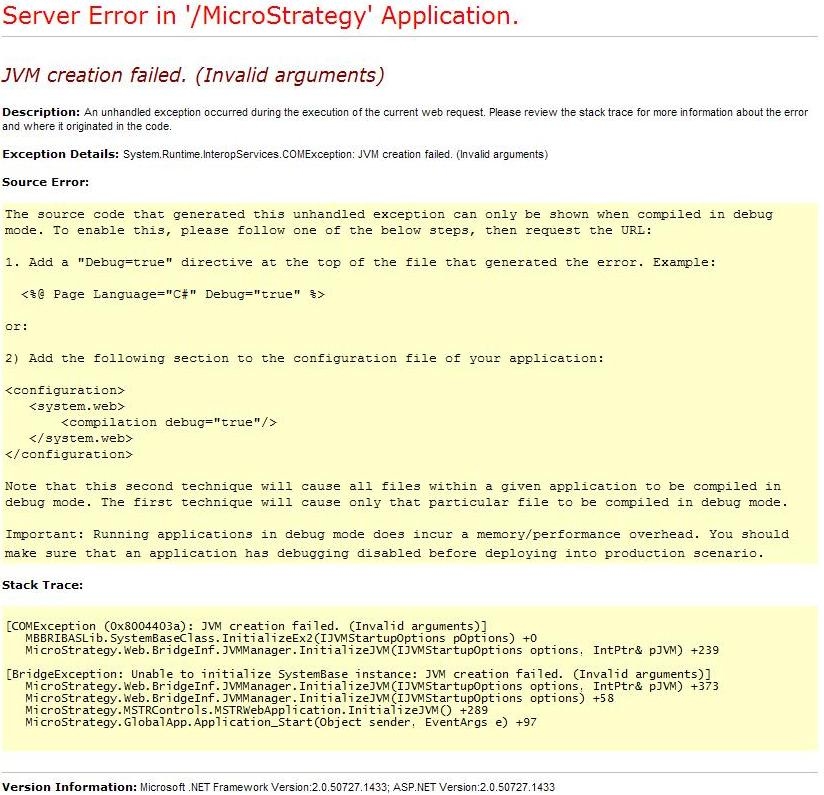
Server Error in `/Strategy` Application.
JVM creation failed. (Invalid arguments)
Description: An unhandled exception occurred during the execution of the current web request. Please review the stack trace for more information about the error and where it originated in the code.
Exception Details: System.Runtime.InteropServices.COMException: JVM creation failed. (Invalid arguments).
CAUSE
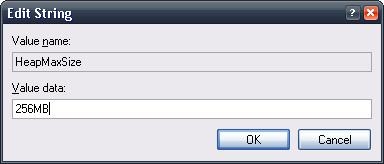
The registry value for the HeapMaxSize key inside the
HKEY_LOCAL_MACHINE\Software\Wow6432Node\Strategy\JNI Bridge 64\Configuration\JVM Options\HeapMaxSize
ACTION
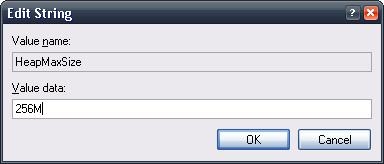
When modifying this key, the value should be set in Megabytes but should only contain the 'M' to represent the unit, like shown in the image below.
Registry Modification Warning:
Modifying registry values incorrectly may cause serious, system-wide problems that may require the re-installation of Microsoft Windows. Any edit of the registry is done at the user's own risk. Since these are user-initiated changes, they are not covered by any Strategy warranty. If using Microsoft Windows, the user should backup the registry and/ or update an Emergency Repair Disk prior to alterations.
