EducationSoftwareStrategy.com
StrategyCommunity

Knowledge Base

Product

Community

Knowledge Base

TopicsBrowse ArticlesDeveloper Zone

Product

Download SoftwareProduct DocumentationSecurity Hub

Education

Tutorial VideosSolution GalleryEducation courses

Community

GuidelinesGrandmastersEvents
x_social-icon_white.svglinkedin_social-icon_white.svg
Strategy logoCommunity

© Strategy Inc. All Rights Reserved.

LegalTerms of UsePrivacy Policy
  1. Home
  2. Topics

KB20818: How to determine if the Named User license compliance check was successful in MicroStrategy Intelligence Server 9.x and 10.x


Community Admin

• Strategy


When the Strategy Intelligence Server 9.x and 10.x is running license compliance check, messages are written to the DSSErrors.log file which is located in default log directory on Windows in C:\Program Files(x86)\Common Files or in the log direction for Universal. The following messages are indicative of a complete compliance check:
2009-03-26 00:15:54.242-05:00 Server checking License compliance has the following license key: XXXX
2009-03-26 00:15:54.273-05:00 Server is checking Named User Licenses.
...
.....
2009-03-26 00:15:54.695-05:00 Server finishes checking Named User Licenses.
The time in which the Named User compliance check runs can be changed via the Strategy Intelligence Server Configuration under Server Definition --> Advanced:
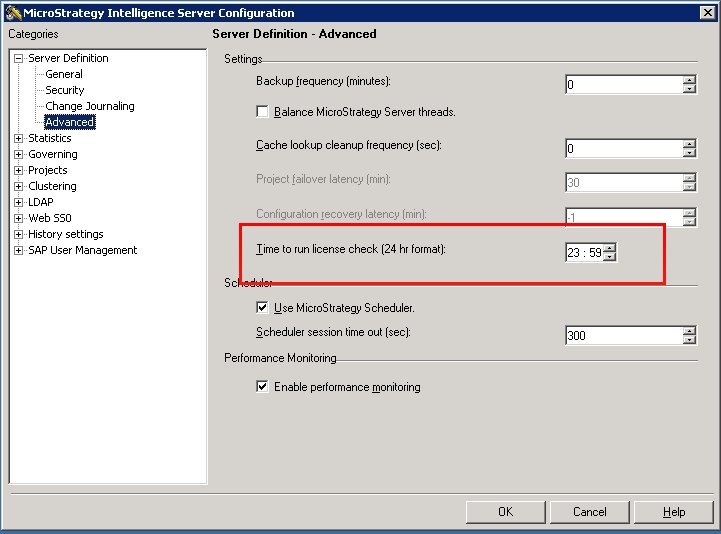
 

ka04W000000OadrQAC_0EM440000002B6R.jpeg


Comment

0 comments

Details

Knowledge Article

Published:

June 7, 2017

Last Updated:

June 7, 2017