EducationSoftwareStrategy.com
StrategyCommunity

Knowledge Base

Product

Community

Knowledge Base

TopicsBrowse ArticlesDeveloper Zone

Product

Download SoftwareProduct DocumentationSecurity Hub

Education

Tutorial VideosSolution GalleryEducation courses

Community

GuidelinesGrandmastersEvents
x_social-icon_white.svglinkedin_social-icon_white.svg
Strategy logoCommunity

© Strategy Inc. All Rights Reserved.

LegalTerms of UsePrivacy Policy
  1. Home
  2. Topics

KB20839: When delivering a report as an Excel File delivery with custom formatting in MicroStrategy Narrowcast Server 9.x the formatting is not applied.


Community Admin

• Strategy


SYMPTOM:
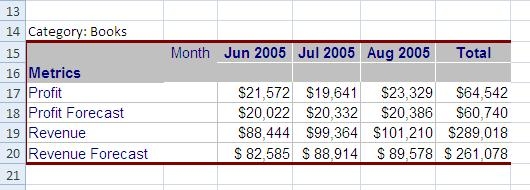
In Strategy Narrowcast Server 9.x when a using a file delivery in excel format for a report with custom formatting, this format is not seen in the Excel file delivered by Narrowcast. This does not happen when exporting from Strategy Desktop. In the example below the report in Desktop has borders defined with a custom color:
 

ka04W000000OgqsQAC_0EM440000002B6v.jpeg

In the Excel delivered by narrowcast shows without the borders formatting:
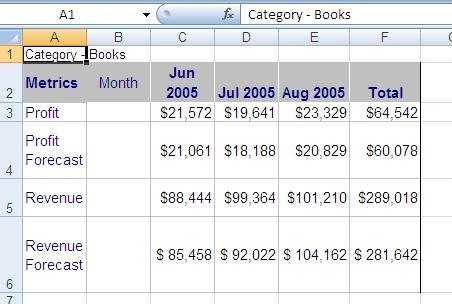
 

ka04W000000OgqsQAC_0EM440000002B79.jpeg

STEPS TO REPRODUCE:

  • In Strategy Desktop edit the Category Sales Report located in Strategy Tutorial\Public Objects\Reports\Subject Areas\Sales and Profitability Analysis.
  • In the Grid menu, select Grid Borders and choose a thick line with a custom color.
ka04W000000OgqsQAC_0EM440000002B70.jpeg
  • Run the report in Strategy Desktop and export it to Excel. The Excel file has the borders, except for the right border as explained in Tech note KB5700-8X-2744.
ka04W000000OgqsQAC_0EM440000002B7A.jpeg
  • In Strategy Narrowcast create a file service using Service wizard. When prompt for Type, select "Create a new Narrowcast Server document" and choose Excel.
ka04W000000OgqsQAC_0EM440000002B6t.jpeg
  • In the File Saved Documents window, select "Excel template - 1 sheet".
  • Go to the Insert menu and select "New Information Object". Select the Category Sales Report modified in step 1.
ka04W000000OgqsQAC_0EM440000002B78.jpeg
  • Create a subscription and associate a schedule and save the service.
  • Run the Service immediately and open the file created.
ka04W000000OgqsQAC_0EM440000002B79.jpeg

Notice that the borders are not shown.
 
CAUSE:
This is working as designed. Excel documents using Strategy Narrowcast Server 9.x based templates do not use the formatting defined for reports in Strategy Desktop 9.x or Strategy Web 9.x.
 
ACTION:
Linked documents should be used in the Strategy Narrowcast Server 9.x service to preserve the report formatting defined in Strategy Desktop 9.x or Strategy Web 9.x. 


Comment

0 comments

Details

Knowledge Article

Published:

June 8, 2017

Last Updated:

June 8, 2017