EducationSoftwareStrategy.com
StrategyCommunity

Knowledge Base

Product

Community

Knowledge Base

TopicsBrowse ArticlesDeveloper Zone

Product

Download SoftwareProduct DocumentationSecurity Hub

Education

Tutorial VideosSolution GalleryEducation courses

Community

GuidelinesGrandmastersEvents
x_social-icon_white.svglinkedin_social-icon_white.svg
Strategy logoCommunity

© Strategy Inc. All Rights Reserved.

LegalTerms of UsePrivacy Policy
  1. Home
  2. Topics

KB20853: How to retrieve the previous [N] months from a month attribute in MicroStrategy Developer 9.4.x-10.x using an Oracle warehouse


Stefan Zepeda

Salesforce Solutions Architect • Strategy


The following procedure illustrates how to retrieve the previous months from a month attribute in MicroStrategy 9.4.x-10.x using an Oracle warehouse

The following procedure illustrates how to retrieve the previous months from a month attribute in Strategy 9.4.x-10.x using an Oracle warehouse.
Create the following objects in the Strategy Tutorial project:
Prompts:

  • Enter Month ID: Value prompt of type numeric, default value: 200601.
    • This prompt will prompt on the month id, which must be entered in the YYYYMM format.
  • Enter number of Months: Value prompt of type numeric, default value: 12.
    • This prompt will prompt on the number of months that will be retrieved before the previous prompt.

Filter:

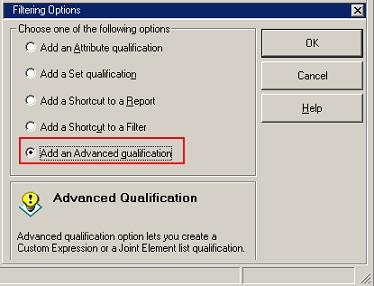
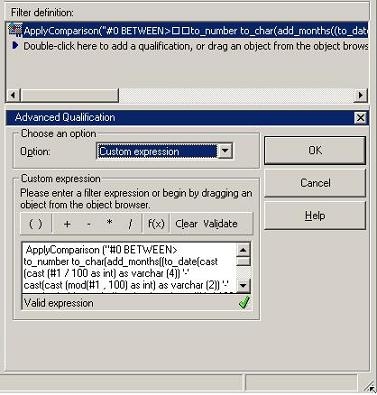
  • Previous months: Filter using an Advanced qualification:
ka02R000000kcRjQAI_0EM440000002EWH.jpeg

 
In the text box, enter the following expression:
ApplyComparison ("#0 BETWEEN>
to_number to_char(add_months((to_date(cast(cast (#1 / 100 as int) as varchar (4)) '-'
cast(cast (mod(#1 , 100) as int) as varchar (2)) '-'
to_char(add_months((to_date(cast(cast (#1 / 100 as int) as varchar (4)) '-'
cast(cast (mod(#1 , 100) as int) as varchar (2)) '-'
'1', 'YYYY-MM-DD') ), -#2), 'MM')
) AND #1", Month@ID, ?, ?)
Note: The SQL query mentioned in this document is specific for Oracle Warehouse and provided as simply an example. If SQL is required for another database platform, users need to contact their database administrator to do so.
ka02R000000kcRjQAI_0EM440000002EWE.jpeg

 
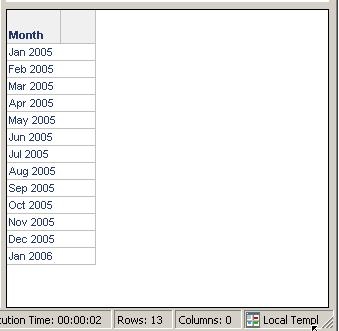
A report with and running with the default prompt answers will return the following:
Grid View
ka02R000000kcRjQAI_0EM440000002EWF.jpeg

 
SQL View
select a11.MONTH_ID MONTH_ID,
a11.MONTH_DESC MONTH_DESC0
from LU_MONTH a11
where a11.MONTH_ID BETWEEN>
to_number to_char(add_months((to_date(cast(cast (200601 / 100 as int) as varchar (4)) '-'
cast(cast (mod(200601 , 100) as int) as varchar (2)) '-'
to_char(add_months((to_date(cast(cast (200601 / 100 as int) as varchar (4)) '-'
cast(cast (mod(200601 , 100) as int) as varchar (2)) '-'
'1', 'YYYY-MM-DD') ), -12), 'MM')
) AND 200601


Comment

0 comments

Details

Knowledge Article

Published:

April 20, 2017

Last Updated:

April 20, 2017