EducationSoftwareStrategy.com
StrategyCommunity

Knowledge Base

Product

Community

Knowledge Base

TopicsBrowse ArticlesDeveloper Zone

Product

Download SoftwareProduct DocumentationSecurity Hub

Education

Tutorial VideosSolution GalleryEducation courses

Community

GuidelinesGrandmastersEvents
x_social-icon_white.svglinkedin_social-icon_white.svg
Strategy logoCommunity

© Strategy Inc. All Rights Reserved.

LegalTerms of UsePrivacy Policy
  1. Home
  2. Topics

KB208680: How to add a Country Alternative Name to be automatically geocoded when using Data Import in MicroStrategy Web


Community Admin

• Strategy


MicroStrategy Analytics Enterprise supports automatic geocoding of geographical attributes when doing Data Import. This will automatically add latitude and longitude information to any geographically identified attribute such as Country. To perform the geocoding every element needs to be compared with a predefined look up table available in the MicroStrategy Intelligence Server. This list might not contain all the country alternative names needed by the MicroStrategy Web when performing Data Import. The following steps will explain how to add a Country Alternative Name into the look up table so that it is correctly geocoded.

How to add an additional Country Alternative Name 

  • In the Strategy intelligence Server machine locate the following file typically under:
    
    C:\Program Files (x86)\Strategy\Intelligence Server\Country.csv

    Note: Backup this file for future reference.
     
  • Stop the Intelligence Server
     
  • Open this file with a text editor, such as Notepad++. 
     
  • Locate the line with the country that needs to be modified. For example, "Democratic Republic of Congo" is located on line 20 and has the ID 19 by default as shown below:
    
    19,"Democratic Republic of the Congo","Austur-Kongo [...]

    Notice that in the Country.csv lookup table the third column corresponds to the Country Alternative Names
     
  • In the third column add the entries needed separated by a comma. Notice that columns are always enclosed by double quotes and are also separated by commas. In the example above the alternative name "CongoDRC" will be added and the portion of the line will look similar to the one shown below:
    
    19,"Democratic Republic of the Congo","Congo DRC,Austur-Kongo [...]
    Note: No extra spaces or characters should be added unless they want to be used in the comparison. 
     
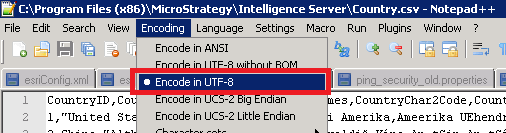
  • Save the file with Unicode Encoding. In Notepad++ this will be equivalent to UTF-8 as shown below:

ka0PW0000000ejpYAA_0EM4400000025wG.jpeg
  • Note: This is very important in order for the Intelligence Server to be able to read the file correctly.
     
  • Start the Intelligence Server.
    Note: Every change on any look up tables require a server restart.

Third Party Software Installation
WARNING:
The third-party product(s) discussed in this technical note is manufactured by vendors independent of Strategy. Strategy makes no warranty, express, implied or otherwise, regarding this product, including its performance or reliability.


Comment

0 comments

Details

Knowledge Article

Published:

June 14, 2017

Last Updated:

February 13, 2024