SYMPTOM:
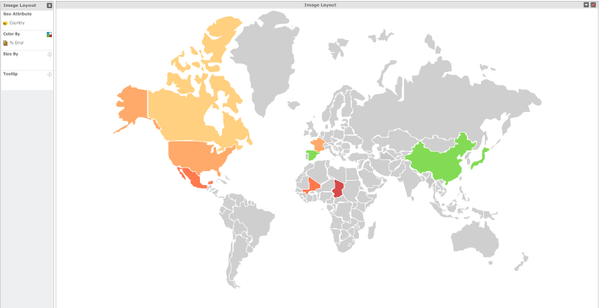
When viewing an Image Layout Map visualization in Strategy Web 9.3.1, all countries appear correctly with data, as shown below:
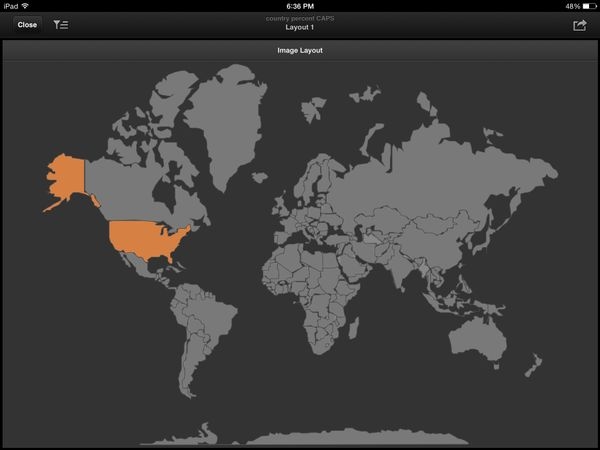
However, when the same visualization is viewed in Strategy Mobile for iPad 9.4.1 iOS Update 3, only data for USA appears, as shown below:
CAUSE:
This is working as designed in Strategy Mobile 9.4.1 iOS Update 3. This can happen when the country names are stored in all upper case letters, such as USA, CANADA, and MEXICO. Strategy Web 9.4.1 resolves these names to the correct country shapes, but in Strategy Mobile 9.4.1 iOS Update 3, only USA is recognized, because it is stored as USA. Other countries are recognized when only the first letter is capitalized, such as Canada and Mexico.
ACTION:
This issue has been addressed in Strategy Mobile 9.4.1 iOS Update 4. Upgrade to this version to the advantage of this fix where the logic of the comparison is no longer case sensitive.
WORKAROUND:
Storing the country names not in full upper case (such as Canada, Mexico, etc.) will plot the countries correctly both in Strategy Web 9.4.1 and in Strategy Mobile 9.4.1 iOS Update 4.
The Strategy Internal Reference Number for the issue discussed in this technical note is 883231.
