EducationSoftwareStrategy.com
StrategyCommunity

Knowledge Base

Product

Community

Knowledge Base

TopicsBrowse ArticlesDeveloper Zone

Product

Download SoftwareProduct DocumentationSecurity Hub

Education

Tutorial VideosSolution GalleryEducation courses

Community

GuidelinesGrandmastersEvents
x_social-icon_white.svglinkedin_social-icon_white.svg
Strategy logoCommunity

© Strategy Inc. All Rights Reserved.

LegalTerms of UsePrivacy Policy
  1. Home
  2. Topics

KB20873: Total column headers are not word wrapped correctly when exported to Microsoft Excel from MicroStrategy Web 9.x


Community Admin

• Strategy


Total column headers are not word wrapped correctly when exported to Microsoft Excel from MicroStrategy Web 9.x

SYMPTOM:
Total column headers are not word wrapping correctly when exported to Microsoft Excel from Strategy Web 9.x.
 
STEPS TO REPRODUCE:
This issue can be reproduced using Strategy Desktop and Web 9.x under the Strategy Tutorial project:

  • Using Strategy Desktop, create a report containing the Region attribute on rows, the Year attribute on columns, and the Revenue metric on columns below the Year attribute.
  • Create an alias for the Revenue metric via Data > Report Data Options > Display > Alias, so that the name is extra long.
  • Set the Wrap text setting to Yes for the Region Headers, Region Subtotal Headers, and Metric Headers via the right-click menu > Formatting > Region Headers (example) > Alignment tab.
  • Run the report and press the F11 key to display Totals. Notice that the report displays cleanly with no issues.
     
ka04W000000ObM2QAK_0EM4400000028Mj.jpeg
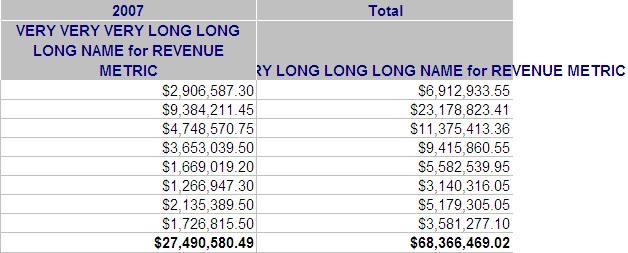
  • Run the report in Strategy Web and export it to Microsoft Excel with formatting. Notice how text is not wrapping for the Total column, and is actually displaying outside of the grid space.
     
ka04W000000ObM2QAK_0EM4400000028Mg.jpeg
  • This issue does not occur if the report is exported from Strategy Desktop. The Total column wraps properly and mimics the view exactly.

CAUSE:
Exporting is handled differently from Strategy Desktop and Web, so additional formatting changes are required to have the export from Strategy Web mimic that of Strategy Desktop.
 
ACTION:
Use the following steps to resolve this issue:

  • Using Strategy Web, open the Advanced Formatting menu for the report and access the Alignment tab.
  • From there select Column Axis in the left drop down, and Subtotal Names in the right drop down. Check 'Wrap Text' for this combination and export to Excel with formatting. Notice that the Total column now wraps properly.
     
ka04W000000ObM2QAK_0EM4400000028Mi.jpeg


Comment

0 comments

Details

Knowledge Article

Published:

June 2, 2017

Last Updated:

June 2, 2017