EducationSoftwareStrategy.com
StrategyCommunity

Knowledge Base

Product

Community

Knowledge Base

TopicsBrowse ArticlesDeveloper Zone

Product

Download SoftwareProduct DocumentationSecurity Hub

Education

Tutorial VideosSolution GalleryEducation courses

Community

GuidelinesGrandmastersEvents
x_social-icon_white.svglinkedin_social-icon_white.svg
Strategy logoCommunity

© Strategy Inc. All Rights Reserved.

LegalTerms of UsePrivacy Policy
  1. Home
  2. Topics

KB208842: How to calculate data of time date type (HH:MM:SS) in Microsoft SQL Server using MicroStrategy Developer 9.x.


Stefan Zepeda

Salesforce Solutions Architect • Strategy


How to calculate data of time date type (HH:MM:SS) in Microsoft SQL Server using MicroStrategy Developer 9.x.

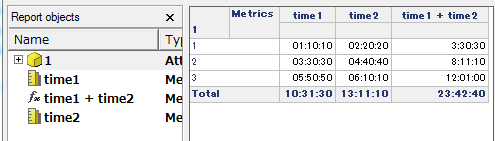
The following grid shows the metrics mapped to the time date type column are calculated in the derived metric and subtotal.
ka02R000000kX69QAE_0EM440000002CEt.jpeg


The following example shows how to create the metrics to calculate on Analytical Engine.
 

  • Create the attributes for the columns. (Convert the time to seconds)
ka02R000000kX69QAE_0EM440000002CEs.jpeg
  • 
    Time1: ApplySimple("datediff(second,0, #0)",time1) 
    Time2: ApplySimple("datediff(second,0, #0)",time2)

     
  • Create the metrics based off the attributes above. (divide by seconds in a day)
ka02R000000kX69QAE_0EM440000002CEq.jpeg
  • 
    time1: (Max() {~} / 86400) 
    time2: (Max() {~} / 86400)


Comment

0 comments

Details

Knowledge Article

Published:

April 10, 2017

Last Updated:

April 10, 2017