EducationSoftwareStrategy.com
StrategyCommunity

Knowledge Base

Product

Community

Knowledge Base

TopicsBrowse ArticlesDeveloper Zone

Product

Download SoftwareProduct DocumentationSecurity Hub

Education

Tutorial VideosSolution GalleryEducation courses

Community

GuidelinesGrandmastersEvents
x_social-icon_white.svglinkedin_social-icon_white.svg
Strategy logoCommunity

© Strategy Inc. All Rights Reserved.

LegalTerms of UsePrivacy Policy
  1. Home
  2. Topics

KB209412: Changes made to a metric's level and/or condition are not saved after saving and closing the metrics definition


Stefan Zepeda

Salesforce Solutions Architect • Strategy


When creating or modifying a metrics definition by changing either (or both) the Level/Condition, these settings are ignored and removed when the user saves and closes the metric. This only happens if the Level and Condition are modified before changing the dynamic aggregation of this metric. If the dynamic aggregation is not changed then then issue should not occur.

SYMPTOM
When creating or modifying a metrics definition by changing either (or both) the Level/Condition, these settings are ignored and removed when the user saves and closes the metric.  This only happens if the Level and Condition are modified before changing the dynamic aggregation of this metric.  If the dynamic aggregation is not changed then then issue should not occur.  
 
STEPS TO REPRODUCE
Follow the steps below to reproduce this issue in Strategy Tutorial 9.4.1:
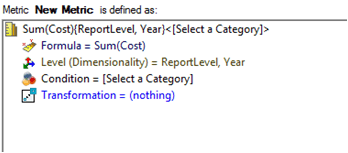
  • Create a new metric in Developer so the definition is Sum([Cost]) 
  • Drag any Attribute(s) to the level dimensionality from the Object Browser
  • Drag any filter to the Condition of the metric from the Object Browser (optional)
ka02R000000kc3JQAQ_0EM440000002CEW.jpeg
  • Select the Subtotals/Aggregation tab and change the dynamic aggregation function to anything other than the current value
ka02R000000kc3JQAQ_0EM440000002CEr.jpeg
  • Save and close the metric
ka02R000000kc3JQAQ_0EM440000002CEU.jpeg
  • Right click the newly created metric and select Edit

    Notice that all the both the Level and Condition are empty.

 
CAUSE
This is a known issue in Strategy Developer 9.x.
 
ACTION
Currently this issue is still being reviewed for feasibility by our Technology team and it is not scoped for any upcoming scheduled Strategy release.
 
WORKAROUND
There are three known workarounds for this issue.
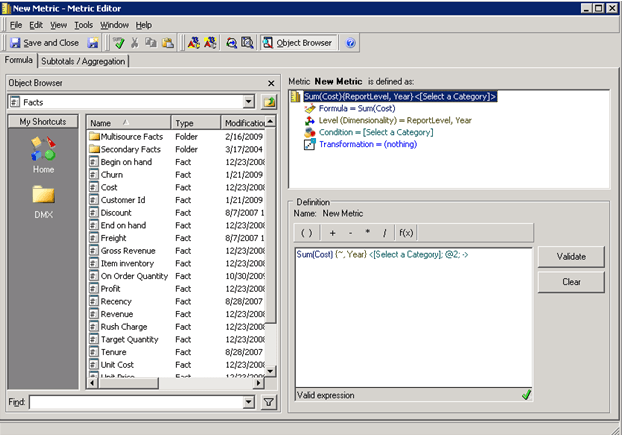
 

  • After step 3 from above, view the metric definition prior to navigating to the ‘Subtotals/Aggregation’ tab
ka02R000000kc3JQAQ_0EM440000002CEp.jpeg
  • Change the Dynamic Aggregation function prior to changing the Level and/or Condition of the metric
     
  • Hard-code the definition of the metric rather than selecting the objects from the Object Browser. In the example above, the metric would be defined as:
ka02R000000kc3JQAQ_0EM440000002CEX.jpeg

Comment

0 comments

Details

Knowledge Article

Published:

May 31, 2017

Last Updated:

May 31, 2017
