SUMMARY
This technical note discusses an issue that may be encountered by users where two illegible characters are seen at the beginning of a plain text file created by a file subscription in Strategy 9.x or 10.x. A workaround for this issue is provided.
DESCRIPTION
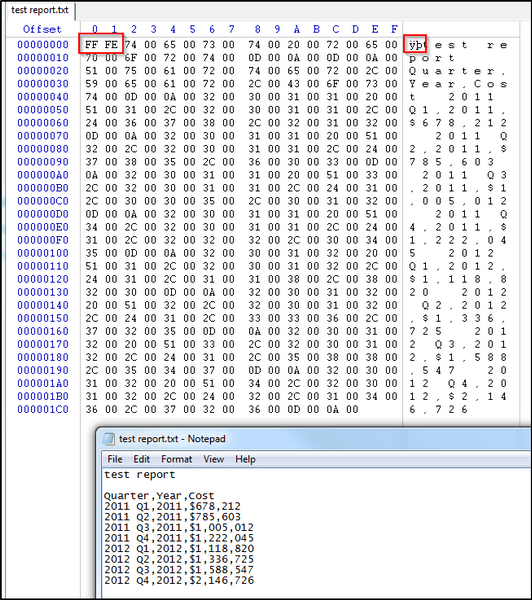
When subscribing a report to be delivered to file as plain text, two unintelligible characters may be seen at the beginning of the file when it is opened (depending on the text editor that is used to view the contents of the file). Microsoft Notepad is able to open and display the file normally, but other applications might show "ÿþ" at the beginning of the text. Using a hex editor software to open the text file, it can be seen that the text is preceded by two extra bytes, 0xFF and 0xFE as shown below.
STEPS TO REPRODUCE
CAUSE
The "ÿþ" characters are the ANSI-encoding output for bytes "0xFF" and "0xFE". These two bytes make up the Unicode Byte Order Mark (BOM) that precedes the text stream in a UTF-16 encoded file. The BOM is used by applications reading the file to interpret certain characteristics of the text stream that immediately follows the BOM. Applications that properly support UTF-16 should understand that the BOM does not represent actual characters, and should not attempt to display the BOM as text. Applications that do not support UTF-16 may incorrectly convert the BOM to ANSI text and output it as "ÿþ".
WORKAROUND
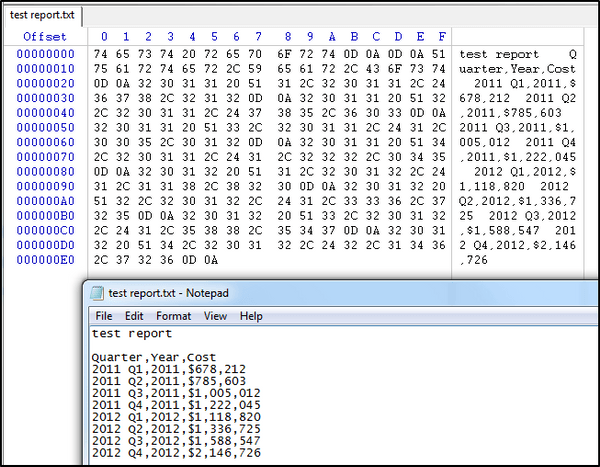
In the event that the text file needs to be used with an application that does not correctly interpret the Unicode Byte Order Mark (BOM), Distribution Services can be set to output files in UTF-8 encoding instead of UTF-16. UTF-8 encoding does not include the BOM as shown below, and the text should be interpreted correctly by the application.
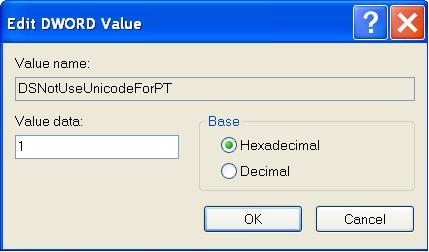
To configure Distribution Services to output files with UTF-8 encoding, the following registry change must be performed on the Intelligence Server machine. Instructions for 32/64-bit Windows and UNIX/Linux are provided below.
Windows (32-bit)
Windows (64-bit)
UNIX/Linux
Note: The Intelligence Server needs to be restarted for the changes to take effect.
For additional information regarding Unicode, UTF-8, UTF-16, and the Byte Order Mark, refer to the following Wikipedia articles.
http://en.wikipedia.org/wiki/Unicode
http://en.wikipedia.org/wiki/UTF-8
http://en.wikipedia.org/wiki/UTF-16
http://en.wikipedia.org/wiki/Byte_order_mark
Third Party Website/Software WARNING:
This technical note contains a link to a third party website that is not under the control of Strategy. When the user accesses a third party web site, the user does so at his or her own risk and acknowledges that Strategy is not responsible or liable for any content, advertising, products or other materials available from such third party sites. Mention of third party companies and web sites in this technical note is for informational purposes only and does not constitute an endorsement or recommendation.
The third-party product(s) discussed in this technical note is manufactured by vendors independent of Strategy. Strategy makes no warranty, express, implied or otherwise, regarding this product, including its performance or reliability.
The Strategy Internal Reference Number for the issue discussed in this technical note is 979506.
