SUMMARY:
This issue has been classified as a defect by Strategy. The impact is limited to Strategy Web 9.4.1 Hotfix 6 product only when running a document with a metric selector in Flash mode that has “Automatically update when there is no data for the current selection” option enabled. There are workarounds available in this document.
SYMPTOM:
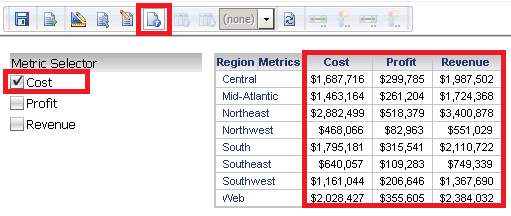
In Flash mode a user selects more than two metrics in a metric selector (“Automatically update when there is no data for the current selection” option enabled) and saves the document. When it is re-opened the selector does not show correct selections but always the first metric is selected while more metrics are present in the grid in Strategy Web 9.4.1 Hotfix 6 as shown below:
STEPS TO REPRODUCE:
1. In Strategy Tutorial, create a report with Region attribute and Cost, Profit, Revenue metrics.
2. Using the created report as a dataset, create a document.
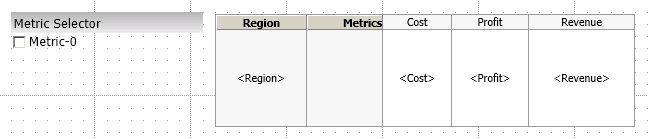
3. Create a metric selector and the grid that has Region, Cost, Profit, and Revenue.
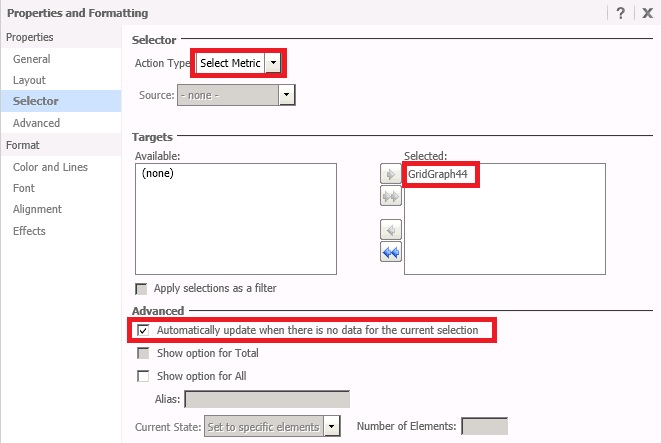
4. Make sure that the selector targets the grid and option “Automatically update when there is no data for the current selection” enabled:
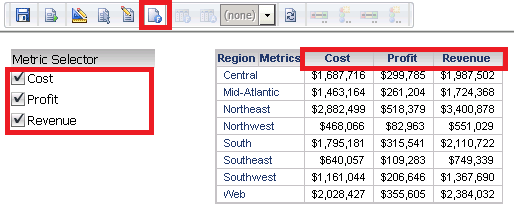
5. Run the document in Flash mode. Everything looks as expected:
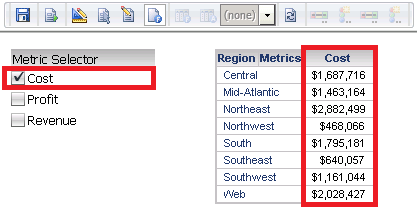
6. Select Profit metric, the grid gets updated
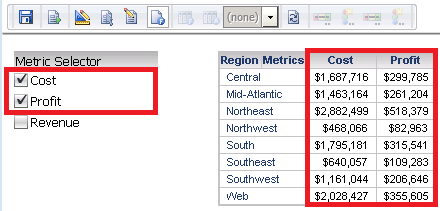
7. Save the document when two or all three metrics are selected in the metric selector. For demonstration purpose, three metrics were selected and the document was saved.
8. Close the document. All selections in the metric selector have to be saved as default ones and displayed when the document is re-opened. However, only the first metric is checked in the metric selector while all three metrics are present on the grid:
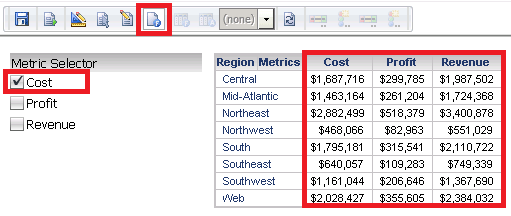
NOTE: The same issue occurs with a checklist and button bar selectors.
VIDEO:
CAUSE:
It appears to specifically affect documents with a checkbox, listbox and button bar selectors in Flash mode when “Automatically update when there is no data for the current selection” option enabled in Strategy Web 9.4.1 Hotfix 6. This has been classified as a defect.
ACTION:
Starting in 10.x Flash mode has been deprecated, since the issue only occurs in Flash mode, this has not been scoped for any future releases.
WORKAROUNDS:
For additional potential workarounds from other users, we encourage that you ask a question in our community forums on this issue.
