EducationSoftwareStrategy.com
StrategyCommunity

Knowledge Base

Product

Community

Knowledge Base

TopicsBrowse ArticlesDeveloper Zone

Product

Download SoftwareProduct DocumentationSecurity Hub

Education

Tutorial VideosSolution GalleryEducation courses

Community

GuidelinesGrandmastersEvents
x_social-icon_white.svglinkedin_social-icon_white.svg
Strategy logoCommunity

© Strategy Inc. All Rights Reserved.

LegalTerms of UsePrivacy Policy
  1. Home
  2. Topics

KB210446: The leading and trailing white spaces are not trimmed when exporting to Excel (xlsx) with Plain Text in MicroStrategy Web 9.4.1


Community Admin

• Strategy


SYMPTOM:
The leading and trailing white spaces are not trimmed when exporting to Excel (xlsx) with Plain Text in Strategy Web 9.4.1.
 
STEPS TO REPRODUCE:
1. Create two tables and populate them with sample data containing trailing and leading white spaces as follows:


create table T1
(
   attr_ID_T1 int,
   attr_desc_T1 varchar(4),
)

create table T2
(
   attr_ID_T2 int,
   attr_desc_T2 varchar(4),
)
------------------------------
INSERT INTO T1
VALUES(1, 'ABC ')      -- single trailing space after 'ABC'

INSERT INTO T2
VALUES(1, ' ABC')      -- single leading space before 'ABC'
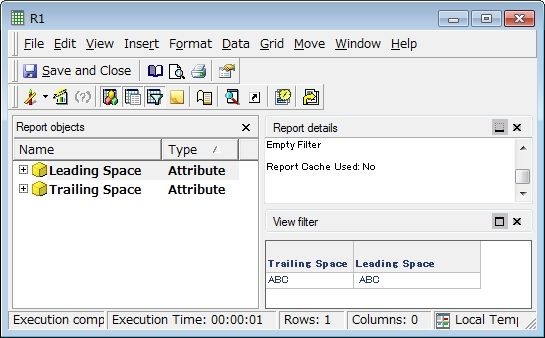
 
2. Create two attributes and then a report.

ka04W000001MKnsQAG_0EM4400000025vN.jpeg

 
3. Go to Strategy Web and enable the “Trim leading and trailing white space for warehouse element data” option, which should trim leading and trailing spaces as the name implies.

ka04W000001MKnsQAG_0EM4400000025vT.jpeg

 
4. Export the report to Excel with Plain Text(2007 or later). The leading and trailing white spaces are not trimmed.
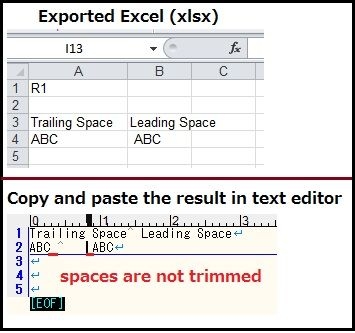
ka04W000001MKnsQAG_0EM4400000025vR.jpeg

 
CAUSE:
This is a known issue in Strategy Web 9.4.1.
 
ACTION:
This issue has been addressed in Strategy 10.0. Upgrade to this or later versions to take advantage of the fix.
 
WORKAROUND:

  1. Instead of Excel 2007 or later (xlsx), export reports to Excel 2003 or earlier (xls), as this is specific to “XLSX with Plain Text”
  2. Because the issue is specific to “xlsx with Plain Text”, export reports as Excel with formatting, either in the xlsx or xls file type.
  3. Modify the attribute definition so that the white spaces are trimmed when extracting data elements from the database.     


[tableCol] -----> RTRIM(LTRIM([tableCol]))  

 
The Strategy Internal Reference Number for the issue discussed in this technical note is 967398.


Comment

0 comments

Details

Knowledge Article

Published:

April 7, 2017

Last Updated:

April 7, 2017