EducationSoftwareStrategy.com
StrategyCommunity

Knowledge Base

Product

Community

Knowledge Base

TopicsBrowse ArticlesDeveloper Zone

Product

Download SoftwareProduct DocumentationSecurity Hub

Education

Tutorial VideosSolution GalleryEducation courses

Community

GuidelinesGrandmastersEvents
x_social-icon_white.svglinkedin_social-icon_white.svg
Strategy logoCommunity

© Strategy Inc. All Rights Reserved.

LegalTerms of UsePrivacy Policy
  1. Home
  2. Topics

KB210666 : The Web Server encountered an unknown runtime error. (You do not have Read Access to the User object 'xxxxxx'.) Error message appears when a user saves his web preferences


Community Admin

• Strategy


This Technical Note describes an error in MicroStrategy Web 9.4.1. It has the potential to impact any user who make changes in his web user preferences. If a user doesn't have the view ACL to himself or a group where the user is included and try to save a change in his web user preferences then the error "You do not have Read Access to the User object 'xxxxxx'" will be displayed.

SUMMARY:
This Technical Note describes an error in Strategy Web 9.4.1. It has the potential to impact any user who make changes in his web user preferences. If a user doesn't have the view ACL to himself or a group where the user is included and try to save a change in his web user preferences then the error "You do not have Read Access to the User object 'xxxxxx'" will be displayed.
 
SYMPTOM:
In Strategy Web 9.4.1 every time that a user saves his web user preferences the following error is being displayed:


The Web Server encountered an unknown runtime error. (You do not have Read Access to the User object 'xxxxxx'.)
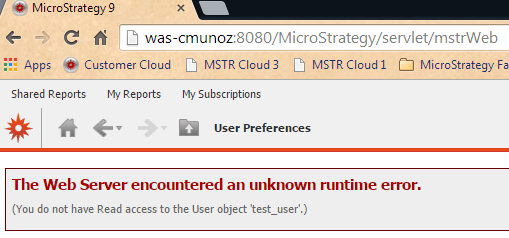
This is a screenshot of the error in Strategy Web:
 

ka04W000000OhNgQAK_0EM4400000025ok.jpeg

 
STEPS TO REPRODUCE:

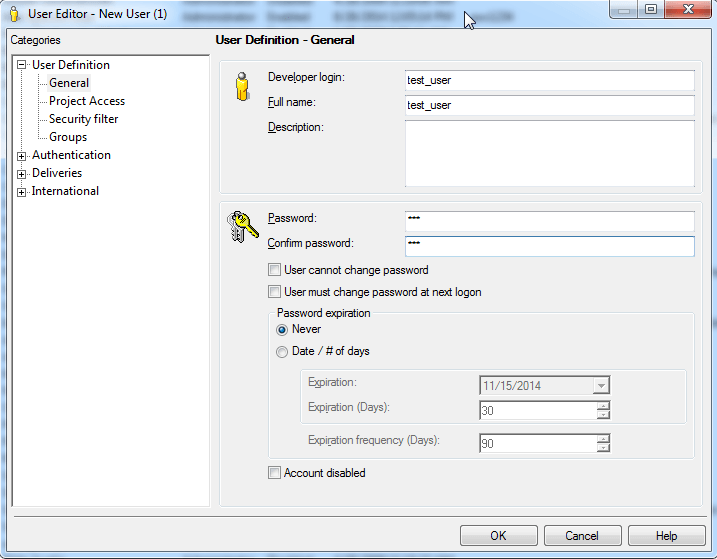
  • In the Strategy Developer 9.4.1 inside the Tutorial Project create a user and assign a password, like shown below:

ka04W000000OhNgQAK_0EM4400000025ol.jpeg
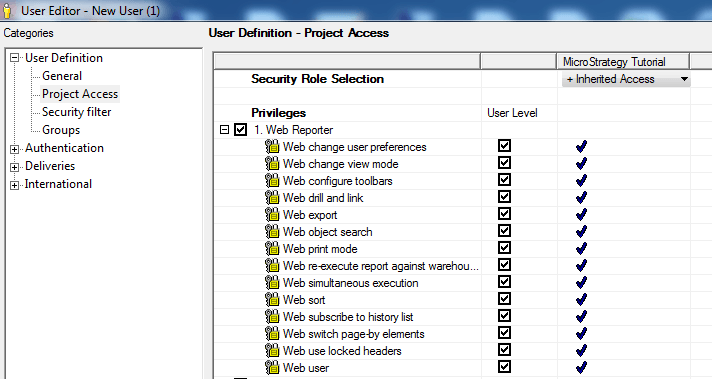
  • Go to Project Access and give the user all the privileges of "Web Reporter", like shown below:

ka04W000000OhNgQAK_0EM4400000025om.jpeg
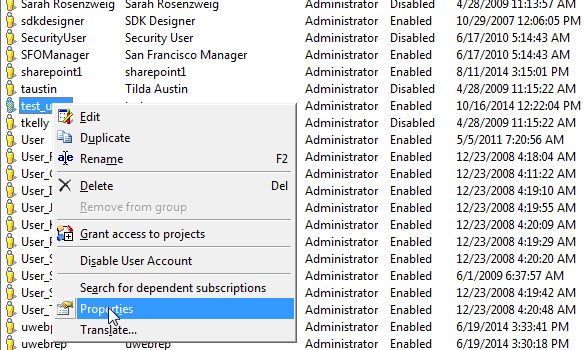
  • Save the user and then Right click the user and go to Properties, like shown below:

ka04W000000OhNgQAK_0EM4400000025or.jpeg
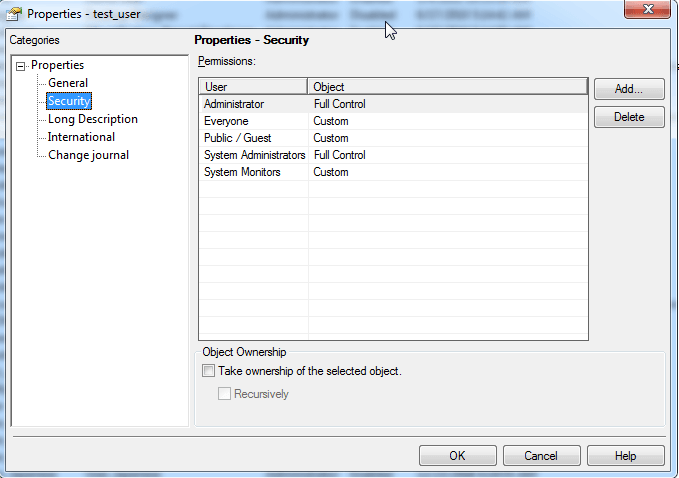
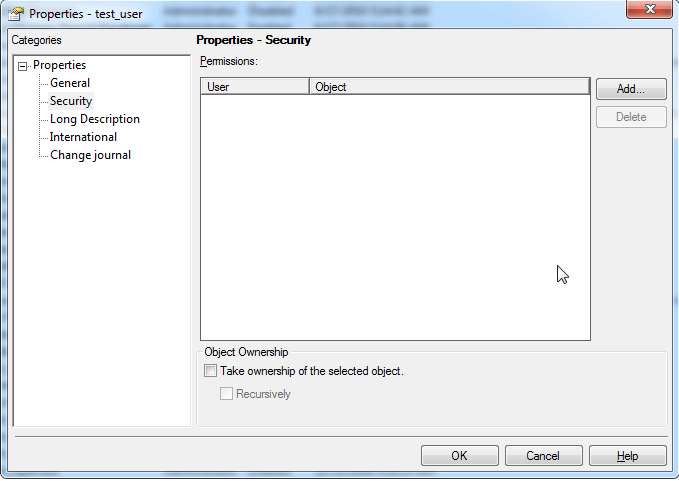
  • Inside Properties go to Security like shown below:

ka04W000000OhNgQAK_0EM4400000025ov.jpeg
  • Then delete all the Permissions like shown below:

ka04W000000OhNgQAK_0EM4400000025ou.jpeg
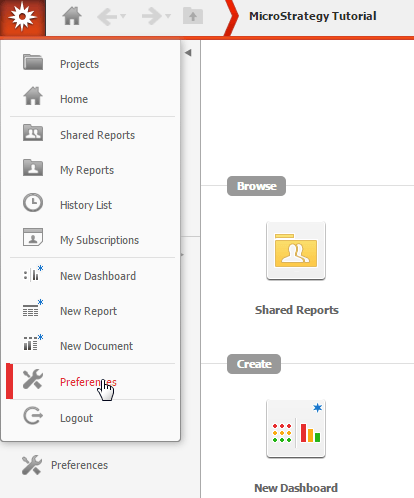
  • Save the changes and login with the new user in Strategy Web and access the Web User Preferences in the home page, like shown below:
ka04W000000OhNgQAK_0EM4400000025on.jpeg
  • Then inside User Preferences make a change and click on the button Apply after that the following error will be displayed:

ka04W000000OhNgQAK_0EM4400000025ok.jpeg

 
CAUSE:
The user doesn't have the view ACL privilege granted to himself or a group where the user is include.
 
ACTION:
 
In Strategy Developer give the user view ACL privileges to himself or a group were he is include for instance the group "Everyone", like shown below:
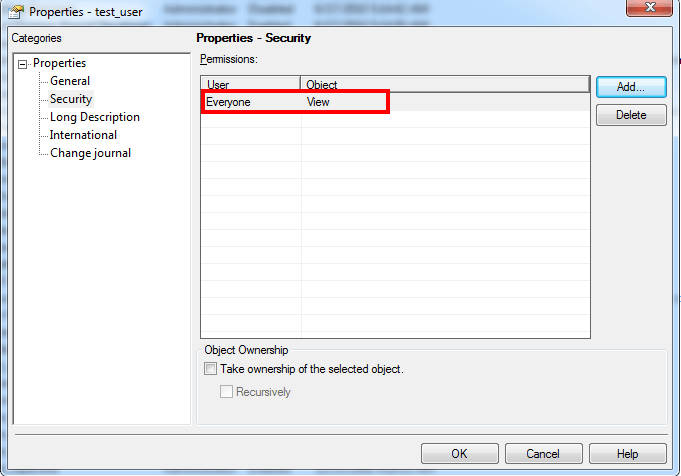
 

ka04W000000OhNgQAK_0EM4400000025oj.jpeg


Comment

0 comments

Details

Knowledge Article

Published:

May 24, 2017

Last Updated:

May 24, 2017