SUMMARY:
This article provides detailed instructions on how to create a Freeform SQL report in Enterprise Manager that lists unread History List Messages. Why is this important? Reports that are sent to the History use system resources (CPU, Memory, Disk space, and DBMS) and users have the ability to schedule reports to the History List. This combination can have a negative impact on system performance. This article provides a way to monitor History List messages and whether or not they are being used.
SETUP:
For the Project that is going to be monitored, you need to add “Subscription Deliveries” and “Inbox Messages”.
In Strategy Developer, navigate to:
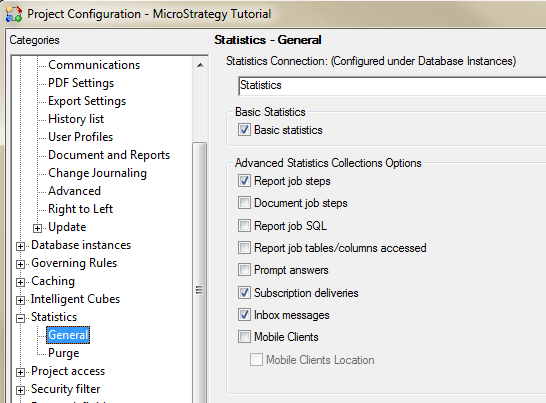
Note: Turning on these statistics may reduce server performance. Only enable statistic levels that are required for your reporting. For example: records are written to several Statistics tables when users send reports to the History List or when they read, rename, remove, etc. the messages in the History List page.
CREATE FREEFORM SQL (FFSQL) REPORT IN ENTERPRISE MANAGER
Use the following SQL to create the FFSQL report. For more details about how to create and run FFSQL reports, review the "Advanced Reporting Guide" product manual included in your Strategy installation
SELECT
	a11.DAY_ID as "DAY ID",
	max(a12.MESSAGETITLE) as Message_Title,
	max(a12.MESSAGEID) as Message_GUID,
	max(a12.USERNAME) as USER_NAME,
	max(a12.SUBSCRIPTIONID) as SUB_GUID,
	max(a11.SUBINSTNAME) as SUB_INSTANCE_NAME
FROM
	dbo.IS_MESSAGE_STATS a11,
	dbo.IS_INBOX_ACT_STATS a12
WHERE
	a12.MESSAGEID NOT IN (SELECT MESSAGEID FROM IS_INBOX_ACT_STATS WHERE INBOXACTION=6)
	AND a11.HISTORYLISTMESSAGEID=a12.MESSAGEID
	AND a11.SESSIONID=a12.SESSIONID
GROUP BY a12.MESSAGEID, a11.DAY_ID;
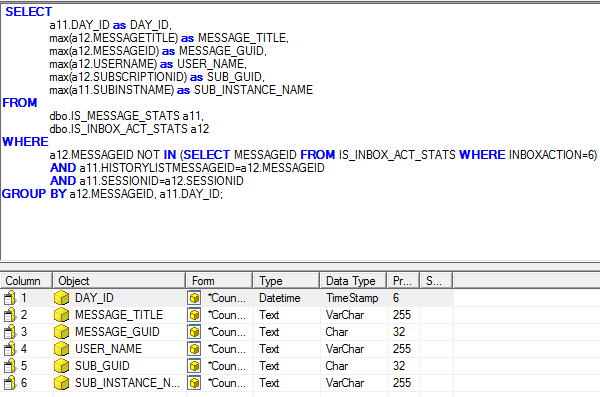
The report will have the following layout:

SAMPLE RESULTS
TEST 1 – NO REPORTS READ FROM HISTORY LIST
Schedule 4 reports to the History List. None of them have been read.
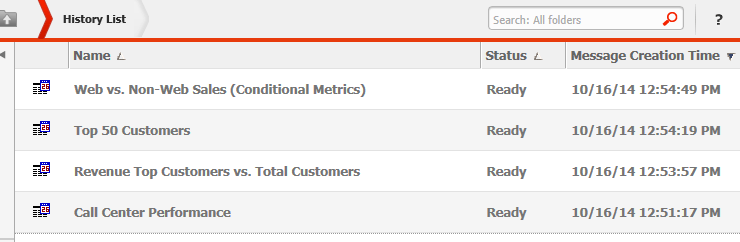
The FFSQL Unread History List Message report will return:

TEST 2 – ONE REPORT READ FROM HISTORY LIST
One report is read in History List in Strategy Web.
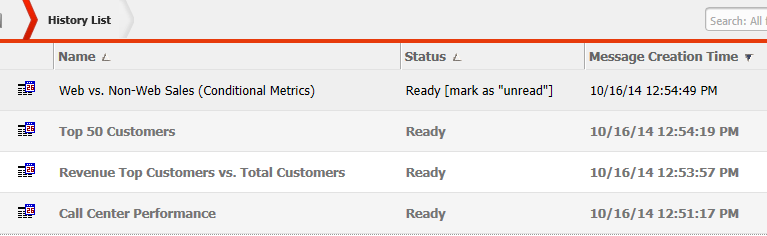
Only 3 History List Messages listed in the FFSQL report:

NOTE: The Statistics Tables keep a history of the “read”. If you manually reset a report to back to “Unread” status in the History List, it will not display on this report. This report lists message that have never been read.
