SUMMARY
This document outlines a system error that is received when running reports against a database which supports parameterized queries. This issue has been identified as a defect with Strategy 9.3.x and earlier versions and has been fixed in Strategy 9.4.1 and later versions.
SYMPTOM
In Strategy 9.3.x or earlier, the following error is received when running reports against a database which supports parameterized queries. The following example error message is received when the warehouse is on an Oracle 11g database:
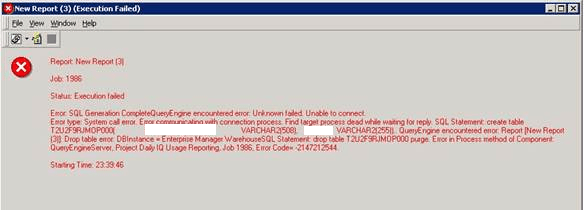
Error: SQL Generation Complete
QueryEngine encountered error: Unknown failed. Unable to connect.
Error type: System call error. Error communicating with connection process. Find target process dead while waiting for reply. SQL Statement: create table ZZTOWDE4Z6BOP000(
XXXXXX  VARCHAR2(508),
XXXXXX VARCHAR2(255))..
QueryEngine encountered error: Report [New Report (3)]: Drop table error: DBInstance = Enterprise Manager WarehouseSQL Statement: drop table ZZTOWDE4Z6BOP000 purge.
Error in Process method of Component: QueryEngineServer, Project Enterprise Manager_freshstart, Job 21843, Error Code= -2147212544.
CAUSE
This is a known issue with Strategy 9.3.x and earlier in a case where parameterized inserts is enabled on the database connection and when a large volume of data is transferred to the database through this connection.
ACTION
This issue has been resolved in Strategy 9.4.1 and later versions. Upgrade to the latest Strategy platform release or feature release version to take advantage of the fix.
