EducationSoftwareStrategy.com
StrategyCommunity

Knowledge Base

Product

Community

Knowledge Base

TopicsBrowse ArticlesDeveloper Zone

Product

Download SoftwareProduct DocumentationSecurity Hub

Education

Tutorial VideosSolution GalleryEducation courses

Community

GuidelinesGrandmastersEvents
x_social-icon_white.svglinkedin_social-icon_white.svg
Strategy logoCommunity

© Strategy Inc. All Rights Reserved.

LegalTerms of UsePrivacy Policy
  1. Home
  2. Topics

KB213340: In MicroStrategy Analytics Enterprise 9.4.x, data is not joined as expected on a report services document grid when using datasets created from data import cubes


Community Admin

• Strategy


This document discusses a scenario where data on a report services document grid does not display as expected because of incorrect joins done between the datasets which are created from data import cubes. This behavior is seen because of incorrect data relationship(s) in the data import cubes and not because of a product issue.

SUMMARY:
This document discusses a scenario where data on a report services document grid does not display as expected because of incorrect joins done between the datasets which are created from data import cubes. This behavior is seen because of incorrect data relationship(s) in the data import cubes and not because of a product issue.
 
SYMPTOM:
In Strategy Analytics Enterprise 9.4.x, in a report services document (RWD) containing multiple datasets which are created from data import cubes, the data displayed on the RWD grid is incorrect as the datasets are joined incorrectly through a cross join. This issue is seen even after the related attributes in both the datasets are linked together. 
 
STEPS TO REPRODUCE:
 

  • Import data from any source to create cube DI1. This cube has data for a parent attribute such as 'Country' and corresponding metric data. 
  • Create a second data import cube DI2 which has data for the parent attribute 'Country' and a child attribute such as 'Call Center'. The data relationship between the parent and child attribute is expected to be 1:M.
  • Create a report services document with datasets DI1 and DI2.
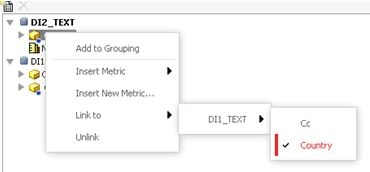
  • Link the 'Country' attribute between both the datasets as shown below:

ka04W000000Oby7QAC_0EM4400000025uN.jpeg
  • Add a grid to the document and add attributes 'Country', 'Call Center' and metric 'M1'. 
  • A cross join is seen in the data on the grid where all centers get associated to all countries.

 
CAUSE
A possible cause for this issue is if the data does not have a clearly defined relationship - for example, it has a mix of 1:M and M:M relationship between the parent and child attributes. For example, in the dataset which establishes the relationship between parent and child, the data is as below. As seen in the data below, most call centers have one parent (1:M relationship), however, the call center 'Frankfurt' has more than one parent (M:M relationship). 


Country (PARENT)Call Center (CHILD)USABostonUSAAtlantaGermanyFrankfurtUSAFrankfurtGermanyDuisbergGermanyBerlin

 
Country (PARENT)Call Center (CHILD)USABostonUSAAtlantaGermanyFrankfurtUSAFrankfurtGermanyDuisbergGermanyBerlin

 
Country (PARENT)Call Center (CHILD)USABostonUSAAtlantaGermanyFrankfurtUSAFrankfurtGermanyDuisbergGermanyBerlin

 
Country (PARENT)Call Center (CHILD)USABostonUSAAtlantaGermanyFrankfurtUSAFrankfurtGermanyDuisbergGermanyBerlin

 
Country (PARENT)Call Center (CHILD)USABostonUSAAtlantaGermanyFrankfurtUSAFrankfurtGermanyDuisbergGermanyBerlin

 
Country (PARENT)Call Center (CHILD)USABostonUSAAtlantaGermanyFrankfurtUSAFrankfurtGermanyDuisbergGermanyBerlin

 
Country (PARENT)Call Center (CHILD)USABostonUSAAtlantaGermanyFrankfurtUSAFrankfurtGermanyDuisbergGermanyBerlin

 
Country (PARENT)Call Center (CHILD)USABostonUSAAtlantaGermanyFrankfurtUSAFrankfurtGermanyDuisbergGermanyBerlin

 
Country (PARENT)Call Center (CHILD)USABostonUSAAtlantaGermanyFrankfurtUSAFrankfurtGermanyDuisbergGermanyBerlin

 
Country (PARENT)Call Center (CHILD)USABostonUSAAtlantaGermanyFrankfurtUSAFrankfurtGermanyDuisbergGermanyBerlin

 
Country (PARENT)Call Center (CHILD)USABostonUSAAtlantaGermanyFrankfurtUSAFrankfurtGermanyDuisbergGermanyBerlin

 
Country (PARENT)Call Center (CHILD)USABostonUSAAtlantaGermanyFrankfurtUSAFrankfurtGermanyDuisbergGermanyBerlin

 
Country (PARENT)Call Center (CHILD)USABostonUSAAtlantaGermanyFrankfurtUSAFrankfurtGermanyDuisbergGermanyBerlin

 
Country (PARENT)Call Center (CHILD)USABostonUSAAtlantaGermanyFrankfurtUSAFrankfurtGermanyDuisbergGermanyBerlin

 
For data import cubes, it is not possible to define an explicit relationship between the attributes in the dataset. The engine examines the data and builds an implicit relationship. In a case such as above where the relationship is not clear, the Strategy engine cannot establish a relationship and considers these as unrelated attributes. This causes a cross join to be established in the grid data when joining the multiple datasets. 
 
ACTION
Modify the data in the data import source so that the relationship between the parent and child attributes is not ambiguous. 
Note: After fixing the data, it is still necessary to link the common attributes in the data import datasets.


Comment

0 comments

Details

Knowledge Article

Published:

May 31, 2017

Last Updated:

May 31, 2017