EducationSoftwareStrategy.com
StrategyCommunity

Knowledge Base

Product

Community

Knowledge Base

TopicsBrowse ArticlesDeveloper Zone

Product

Download SoftwareProduct DocumentationSecurity Hub

Education

Tutorial VideosSolution GalleryEducation courses

Community

GuidelinesGrandmastersEvents
x_social-icon_white.svglinkedin_social-icon_white.svg
Strategy logoCommunity

© Strategy Inc. All Rights Reserved.

LegalTerms of UsePrivacy Policy
  1. Home
  2. Topics

KB213490: Error "Conversion failed when converting the varchar value 'xxxx' to data type int" happens when displaying Picture type attribute form using ApplySimple in expression against SQL Server 2012 in MicroStrategy Analytics 9.4.1


Community Admin

• Strategy


This knowledge base article outlines an error which occurs when displaying Picture type attribute form.

SYMPTOM:
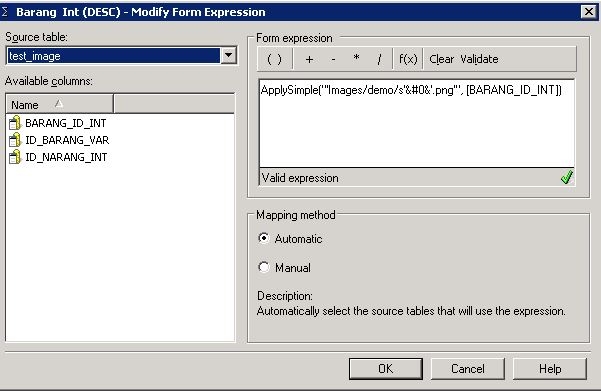
The attribute form is in Picture type and defined with the following ApplySimple function with Int type column [ID_BARANG] as the input parameter against SQL Server 2012.


ApplySimple("'images/demo/'�&'.png'", [ID_BARANG])

However, when running reports with attribute to show the picture form in Web, error message happens in both Web and Developer.

ka04W000000OdedQAC_0EM440000002C7m.jpeg


Conversion failed when converting the varchar value 'images/demo/s' to data type int.

 
STEPS TO REPRODUCE:
SQL Server 2012 database should be used as the warehouse.
 

    • Create an attribute form as type Picture and us custom expression as below where column [ID_BARANG] is of type Int in the database.
       
ka04W000000OdedQAC_0EM440000002C7e.jpeg
ka04W000000OdedQAC_0EM440000002C7i.jpeg
    • ApplySimple("'images/demo/'�&'.png'", [ID_BARANG])
       
    • Create report with the attribute and show the Picture form.
    • Run report in Web and Developer. Error message will occur.

 
CAUSE:
The syntax used in ApplySimple is incorrect for SQL Server 2012 database.
 
ACTION:
Use Concat function instead.

ka04W000000OdedQAC_0EM440000002C7h.jpeg


Concat("Images/demo/s", [BARANG_ID_INT], ".png")

 
NOTE: This is database specific issue. Using the same expression against Microsoft Access database would not result in any error.


Comment

0 comments

Details

Knowledge Article

Published:

April 7, 2017

Last Updated:

April 7, 2017