EducationSoftwareStrategy.com
StrategyCommunity

Knowledge Base

Product

Community

Knowledge Base

TopicsBrowse ArticlesDeveloper Zone

Product

Download SoftwareProduct DocumentationSecurity Hub

Education

Tutorial VideosSolution GalleryEducation courses

Community

GuidelinesGrandmastersEvents
x_social-icon_white.svglinkedin_social-icon_white.svg
Strategy logoCommunity

© Strategy Inc. All Rights Reserved.

LegalTerms of UsePrivacy Policy
  1. Home
  2. Topics

KB213522: How to remove the “Category:” and “Series:” labels from tooltips in a graph in MicroStrategy Web 9.4.1 and above.


Community Admin

• Strategy


How to remove the “Category:” and “Series:” labels from tooltips in a graph in MicroStrategy Web 9.4.1 and above.

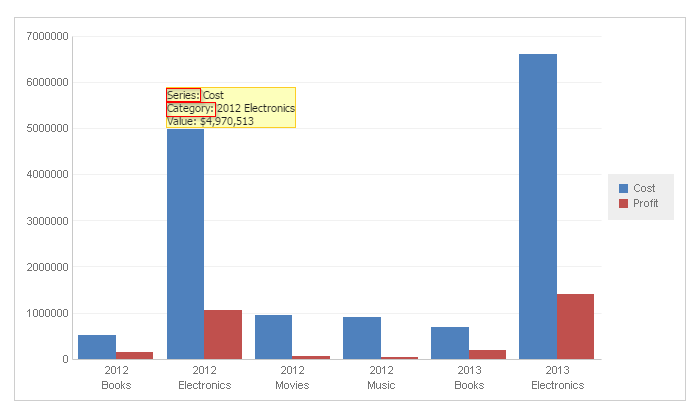
The “Category:” and “Series:” labels in tooltips in a graph can be removed in Strategy Web with macros.
ka04W000000OhnVQAS_0EM440000002JS4.png

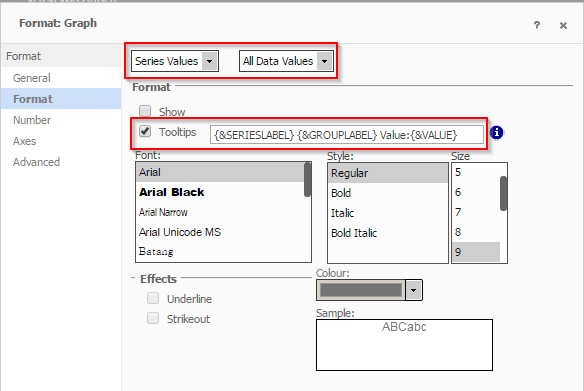
Right mouse click on the graph, go to Format. In the first drop down, select Series Values. In the Tooltips field, enter the macros to display in tooltips.
{&SERIESLABEL} {&GROUPLABEL} Value:{&VALUE}
ka04W000000OhnVQAS_0EM440000002JSJ.png

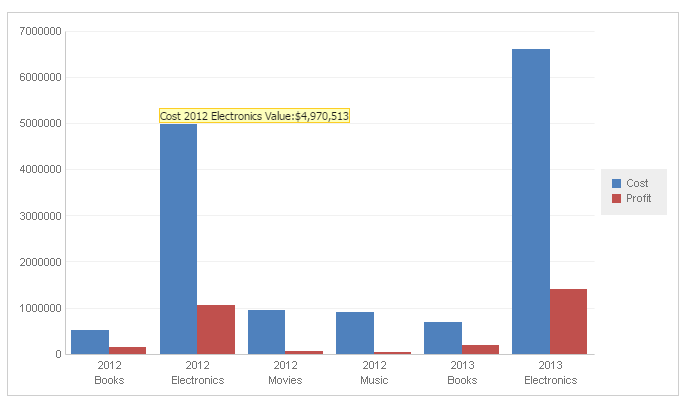
The labels are successfully removed in tooltip as seen below:
ka04W000000OhnVQAS_0EM440000002JSE.png

Comment

0 comments

Details

Knowledge Article

Published:

April 13, 2017

Last Updated:

April 13, 2017