EducationSoftwareStrategy.com
StrategyCommunity

Knowledge Base

Product

Community

Knowledge Base

TopicsBrowse ArticlesDeveloper Zone

Product

Download SoftwareProduct DocumentationSecurity Hub

Education

Tutorial VideosSolution GalleryEducation courses

Community

GuidelinesGrandmastersEvents
x_social-icon_white.svglinkedin_social-icon_white.svg
Strategy logoCommunity

© Strategy Inc. All Rights Reserved.

LegalTerms of UsePrivacy Policy
  1. Home
  2. Topics

KB213600: How to prevent hidden objects from being displayed in MicroStrategy Command Manager 9.x and newer.


Community Admin

• Strategy


This KB discusses how to prevent hidden objects from being displayed in Command Manager.

Under some circumstances, users might want not to display the hidden objects in the result in Strategy Command Manager 9.x and newer.
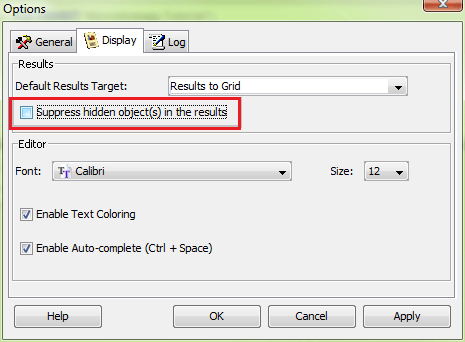
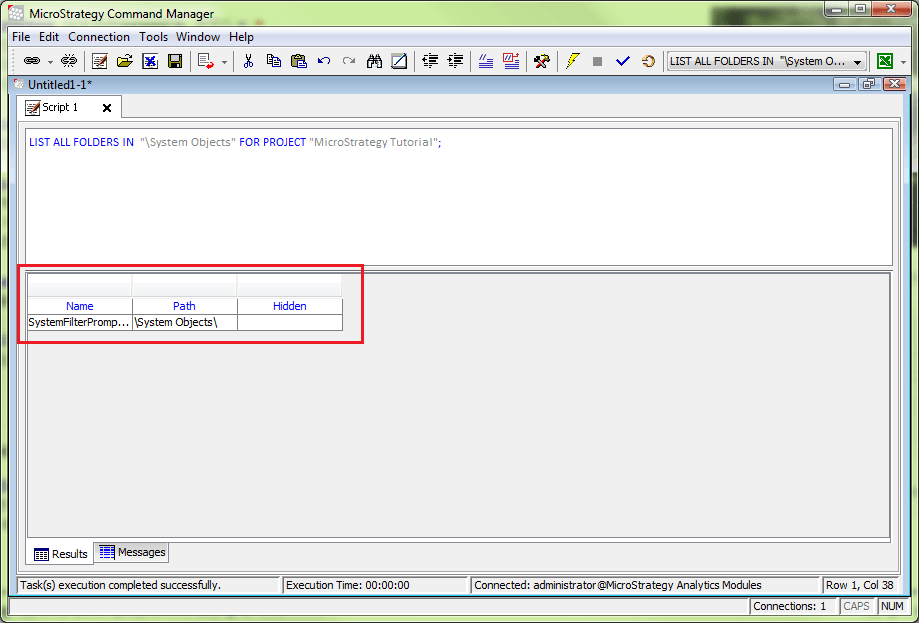
Unchecking “Suppress hidden objects(s) in the result” in the Display tab of the Options menu, avoids displaying the hidden objects in the result in Strategy Command Manager as shown in the image below:
ka04W000000OfRDQA0_0EM440000002HGL.jpeg
ka04W000000OfRDQA0_0EM440000002HGS.jpeg

Note:
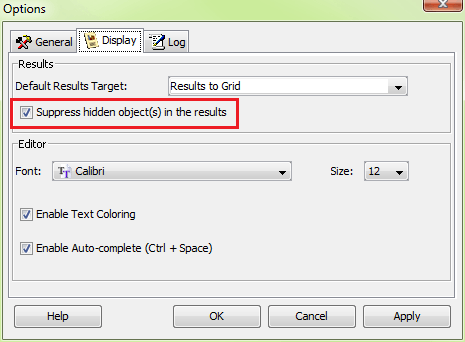
Checking “Suppress hidden object(s) in the results“ shows the hidden objects in the result as shown in the image below.
ka04W000000OfRDQA0_0EM440000002HGK.jpeg

Note:
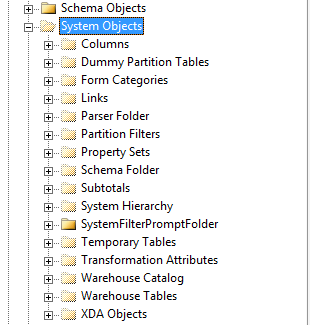
Hidden Objects list from Developer/Desktop as shown in the image below.
ka04W000000OfRDQA0_0EM440000002HGU.jpeg

Comment

0 comments

Details

Knowledge Article

Published:

April 16, 2017

Last Updated:

April 16, 2017