SYMPTOM:
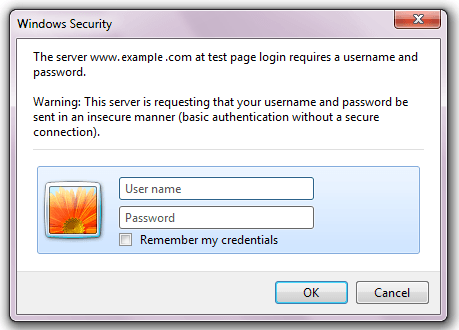
When Strategy Web 9.4.1 is running in Microsoft IIS as the application server, users can configure the server to use windows authentication to authenticate users. Depending on the various system and network level settings, accessing the Strategy Web 9.4.1 Main page will result in users being prompted for network credentials. Even after correct windows credentials have been provided, the network prompt would just reappear, as shown below.
CAUSE:
The browser's network prompt is triggered when the http call generated by the browser is challenged by the application server, and the default credentials provided by the browser fail to verify access during the windows authentication handshake. Given that this handshake challenge is triggered by Microsoft IIS and not by Strategy, there may be a number of reasons for this, for which Microsoft Technical Support may have to be involved to continue troubleshooting.
One possible cause is if the user account that the application pool is running under does not have sufficient network priveleges to validate the credentials against the Microsoft Active Directory.
The application pool identity determines what user account the application pool will use. For more information regarding application pool identity visit the following Microsoft article.
http://www.iis.net/learn/manage/configuring-security/application-pool-identities
ACTION:
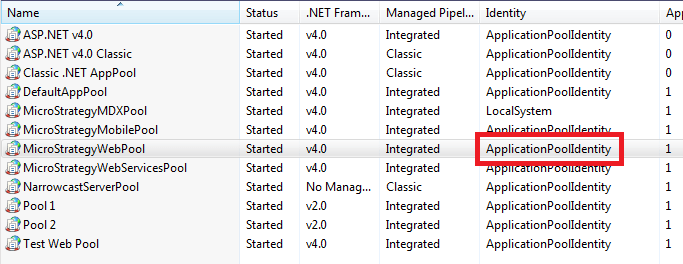
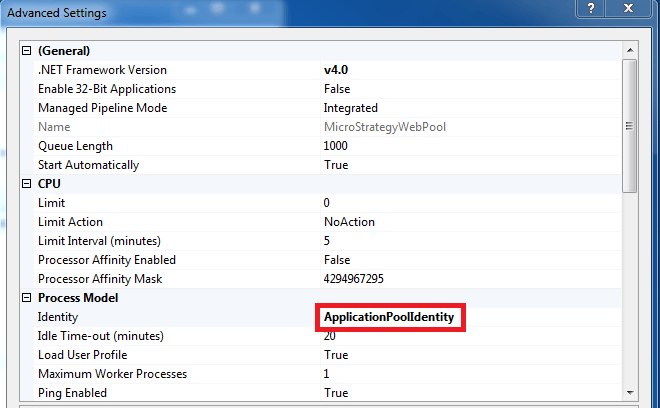
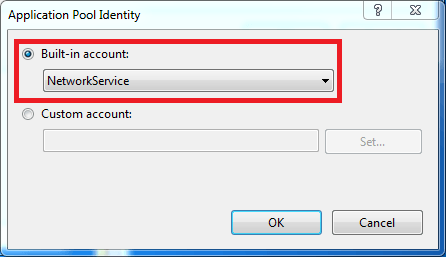
In Microsoft IIS7, it is possible to set what user account the application pool will run under. The setting for this is in the application pool page under Application Pool Identity as shown below:
Third Party Software Installation WARNING:
The third-party product(s) discussed in this technical note is manufactured by vendors independent of Strategy. Strategy makes no warranty, express, implied or otherwise, regarding this product, including its performance or reliability.
