EducationSoftwareStrategy.com
StrategyCommunity

Knowledge Base

Product

Community

Knowledge Base

TopicsBrowse ArticlesDeveloper Zone

Product

Download SoftwareProduct DocumentationSecurity Hub

Education

Tutorial VideosSolution GalleryEducation courses

Community

GuidelinesGrandmastersEvents
x_social-icon_white.svglinkedin_social-icon_white.svg
Strategy logoCommunity

© Strategy Inc. All Rights Reserved.

LegalTerms of UsePrivacy Policy
  1. Home
  2. Topics

KB214075: Reports will not refresh and do not show up in the reports window in MicroStrategy Office 9.4.1 and above.


Community Admin

• Strategy


Reports will not refresh and do not show up in the reports window in MicroStrategy Office 9.4.1 and above.

SYMPTOM:
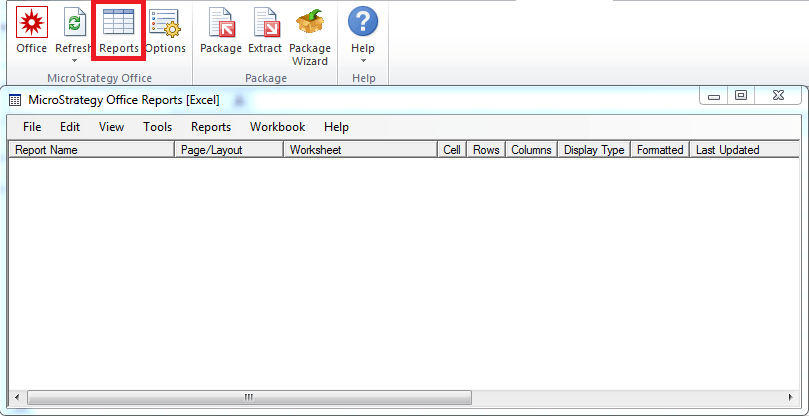
In Strategy Office, users may notice that certain reports do not refresh when refreshing the workbook. Furthermore, the reports that are not being refreshed do not actually show up in the report window shown below:
ka04W000000OcAaQAK_0EM4400000025tN.jpeg

 
CAUSE:
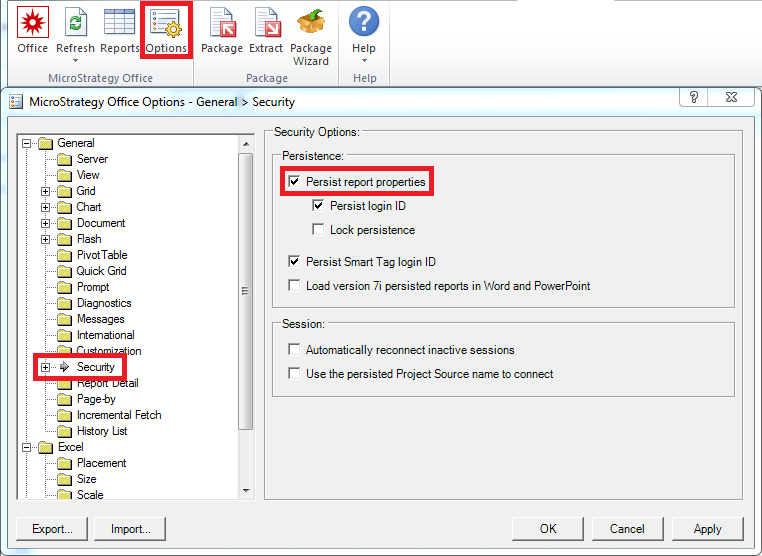
This can be due to the setting "Persist report properties" being disabled.
 
ACTION:
Go to Options > General > Security, and check the box for "Persist report properties", as shown below.
ka04W000000OcAaQAK_0EM4400000025tO.jpeg

Close and reopen Microsoft Excel for the changes to take effect.


Comment

0 comments

Details

Knowledge Article

Published:

May 19, 2017

Last Updated:

May 19, 2017