EducationSoftwareStrategy.com
StrategyCommunity

Knowledge Base

Product

Community

Knowledge Base

TopicsBrowse ArticlesDeveloper Zone

Product

Download SoftwareProduct DocumentationSecurity Hub

Education

Tutorial VideosSolution GalleryEducation courses

Community

GuidelinesGrandmastersEvents
x_social-icon_white.svglinkedin_social-icon_white.svg
Strategy logoCommunity

© Strategy Inc. All Rights Reserved.

LegalTerms of UsePrivacy Policy
  1. Home
  2. Topics

KB214076: Stacked bar graph series white border overlaps the axes outline in MicroStrategy Web 9.4.1


Community Admin

• Strategy


SYMPTOM:
When a stacked bar graph is formatted to give the bars a white border, in Strategy Web 9.4.1, the border overlaps the axes outline, as shown below:
For the vertical stacked bar graph:

ka04W000000OeLmQAK_0EM4400000025tR.jpeg

For the horizontal stacked bar graph:

ka04W000000OeLmQAK_0EM4400000025tQ.jpeg

STEPS TO REPRODUCE:

  • Create a document with at least two attributes and two metrics.
  • Create a stacked bar graph, either vertical or horizontal.
  • Run the document in Editable mode.
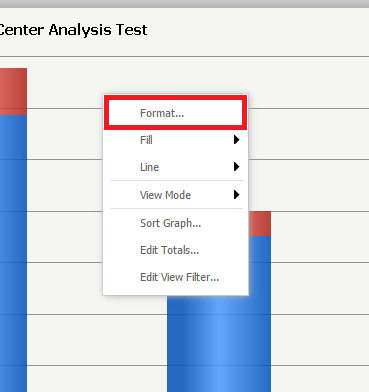
  • Right click on the graph and select "Format" as shown below:
ka04W000000OeLmQAK_0EM4400000025tP.jpeg
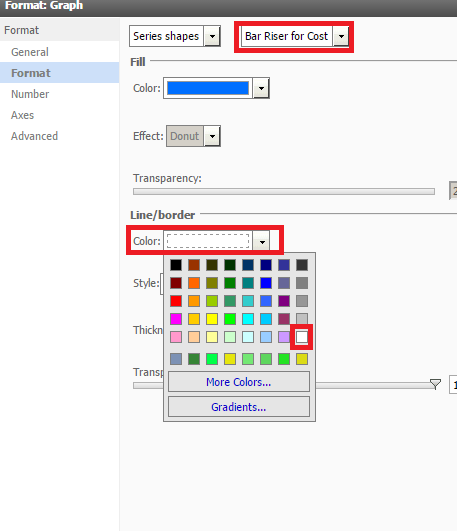
  • Go to "Format".
  • Select "Series shapes" in the first dropdown.  
  • Select a series in the second drop down.
  • Under "Line/border", select "Color" and select White, as shown below:
ka04W000000OeLmQAK_0EM4400000025tS.jpeg
  • Click "OK".

CAUSE:
This is a known issue with Strategy Web 9.4.1.
 
ACTION:
Contact Strategy Technical Support for an update on this issue.
 
The Strategy Internal Reference Number for the issue discussed in this technical note is 979633.


Comment

0 comments

Details

Knowledge Article

Published:

June 12, 2017

Last Updated:

June 12, 2017