EducationSoftwareStrategy.com
StrategyCommunity

Knowledge Base

Product

Community

Knowledge Base

TopicsBrowse ArticlesDeveloper Zone

Product

Download SoftwareProduct DocumentationSecurity Hub

Education

Tutorial VideosSolution GalleryEducation courses

Community

GuidelinesGrandmastersEvents
x_social-icon_white.svglinkedin_social-icon_white.svg
Strategy logoCommunity

© Strategy Inc. All Rights Reserved.

LegalTerms of UsePrivacy Policy
  1. Home
  2. Topics

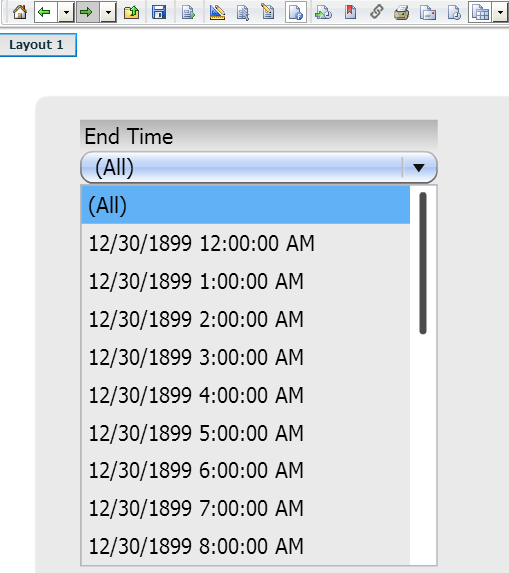
KB214087: "12/30/1899" appears before the time when using Time attributes in selectors in Flash mode in MicroStrategy Web 9.4.0.


Community Admin

• Strategy


SYMPTOM:
In Strategy Web 9.4.0, users have the ability to create a selector based on an attribute of type 'Time.'  When this selector is rendered in Flash view mode, elements of the time attribute have the date '12/30/1899' in addition to the time value.  Refer to the image below for an example.
ka04W000000Oeu8QAC_0EM4400000025sq.jpeg

 
STEPS TO REPRODUCE:

  1. Create a new document using a dataset with an attribute of type 'Time.'
  2. Insert a drop-down selector into the document and add the time attribute to the selector.
  3. Run the document in Interactive mode.  Notice that only elements of time are displayed in the drop-down.
  4. Run the document in Flash mode.  Notice that the date 12/30/1899 is added to each element in addition to the time value.

 
CAUSE:
This is a known issue in Strategy Web 9.4.0.
 
ACTION:
Contact Strategy Technical Support for an update on this issue.
 
The Strategy Internal Reference Number for the issue discussed in this technical note is 872250.


Comment

0 comments

Details

Knowledge Article

Published:

July 10, 2017

Last Updated:

July 10, 2017