EducationSoftwareStrategy.com
StrategyCommunity

Knowledge Base

Product

Community

Knowledge Base

TopicsBrowse ArticlesDeveloper Zone

Product

Download SoftwareProduct DocumentationSecurity Hub

Education

Tutorial VideosSolution GalleryEducation courses

Community

GuidelinesGrandmastersEvents
x_social-icon_white.svglinkedin_social-icon_white.svg
Strategy logoCommunity

© Strategy Inc. All Rights Reserved.

LegalTerms of UsePrivacy Policy
  1. Home
  2. Topics

KB214198: Horizontal Link Bar selector displays an extra line when viewed in Express Mode in MicroStrategy Web


Community Admin

• Strategy


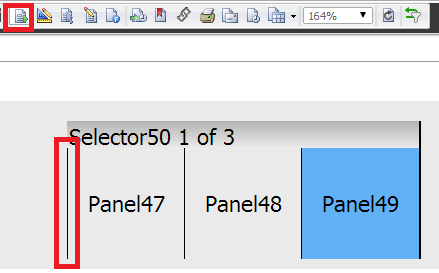
In MicroStrategy Web 9.3.1, users see an extra vertical line to the left of a horizontal Link Bar selector in Express Mode,

SYMPTOM:
In Strategy Web 9.3.1, users see an extra vertical line to the left of a horizontal Link Bar selector in Express Mode, as shown below:
ka04W000000OgHoQAK_0EM4400000025ss.jpeg

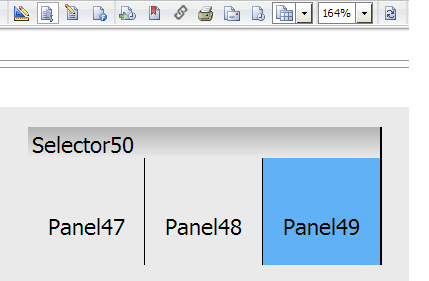
This line does not appear in any other view mode, as shown below.
ka04W000000OgHoQAK_0EM4400000025su.jpeg

STEPS TO REPRODUCE:

  1. In Strategy Web 9.3.1, create a document with a panel stack that has multiple panels.
  2. Create a Link Bar selector to select a panel.
  3. Set Properties & Formatting > Layout > Orientation to "Horizontal" for the Link Bar selector.
  4. Run the document in Express mode. Notice an extra line appears on the left.
  5. Run the document in any other view mode. Notice the extra line is gone.

 
CAUSE:
This is a known issue in Strategy Web 9.3.1 and 9.4.1
ACTION:
Contact Strategy Technical Support for an update on this issue.
WORKAROUND:
To work around this issue, users can insert a shape to cover the line that matches the background.


Comment

0 comments

Details

Knowledge Article

Published:

June 15, 2017

Last Updated:

June 15, 2017