EducationSoftwareStrategy.com
StrategyCommunity

Knowledge Base

Product

Community

Knowledge Base

TopicsBrowse ArticlesDeveloper Zone

Product

Download SoftwareProduct DocumentationSecurity Hub

Education

Tutorial VideosSolution GalleryEducation courses

Community

GuidelinesGrandmastersEvents
x_social-icon_white.svglinkedin_social-icon_white.svg
Strategy logoCommunity

© Strategy Inc. All Rights Reserved.

LegalTerms of UsePrivacy Policy
  1. Home
  2. Topics

KB214291: How to create URL API links that go to the My Reports and My Subscriptions pages in MicroStrategy Web 9.4.1


Community Admin

• Strategy


How to create URL API links that go to the My Reports and My Subscriptions pages in MicroStrategy Web 9.4.1

SYMPTOM:
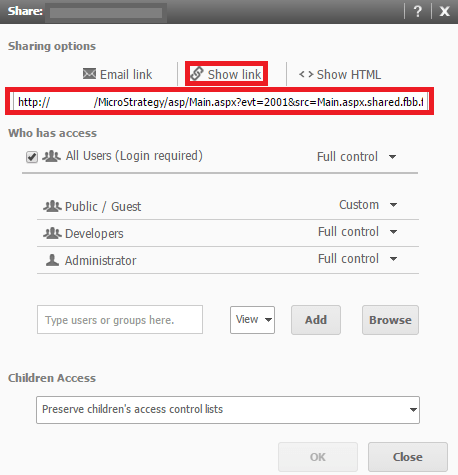
Normally, it is possible to share a folder in Strategy Web 9.4.1 by accessing the Show Link button in the Share interface, as shown below:
ka04W000000OdeiQAC_0EM4400000025sx.jpeg

 
However, this is not possible for the My Reports and My Subscriptions folders, as they do not have a "Share interface".
 
ACTION:
To link to these pages, use the links below:
 
For My Reports:
ASP:


http://[Server Name]/Strategy/asp/Main.aspx?evt=3003&src=Main.aspx.3003&Main.aspx&server=[Intelligence Server]&Port=[Port]&Project=[Project]

JSP:

http://[Server Name]:[Port]/Strategy/servlet/mstrWeb?evt=3003&src=mstrWeb.3003&server=[Intelligence Server]&Port=[Port]&Project=[Project]

Note: Replace all parameters inside the square brackets with the appropriate values.
 
For My Subscriptions:
ASP:

http://[Server Name]/Strategy/asp/Main.aspx?evt=3031&src=Main.aspx.3031&Main.aspx&server=[Intelligence Server]&Port=[Port]&Project=[Project]

JSP:

http://[Server Name]:[Port]/Strategy/servlet/mstrWeb?evt=3031&src=mstrWeb.3031&server=[Intelligence Server]&Port=[Port]&Project=[Project]

Note: Replace all parameters inside the square brackets with the appropriate values.


Comment

0 comments

Details

Knowledge Article

Published:

April 7, 2017

Last Updated:

April 7, 2017