EducationSoftwareStrategy.com
StrategyCommunity

Knowledge Base

Product

Community

Knowledge Base

TopicsBrowse ArticlesDeveloper Zone

Product

Download SoftwareProduct DocumentationSecurity Hub

Education

Tutorial VideosSolution GalleryEducation courses

Community

GuidelinesGrandmastersEvents
x_social-icon_white.svglinkedin_social-icon_white.svg
Strategy logoCommunity

© Strategy Inc. All Rights Reserved.

LegalTerms of UsePrivacy Policy
  1. Home
  2. Topics

KB214295: Grid Column Headers are missing when exporting a RS Document to Excel in MicroStrategy Web 9.4.1.


Community Admin

• Strategy


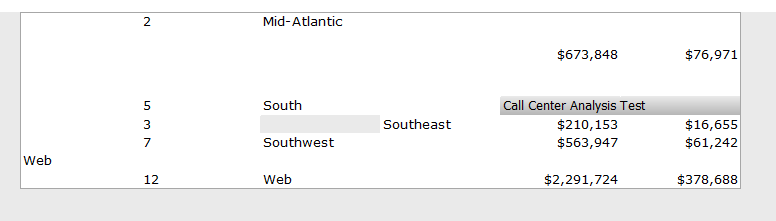
When exporting a document to Excel from MicroStrategy Web 9.4.1 that contains a grid with outline mode on, column headers will be missing in the export.

SYMPTOM:
When exporting a document to Excel from Strategy Web 9.4.1 that contains a grid with outline mode on, column headers will be missing in the export.
 
In Strategy Web 9.4.1:
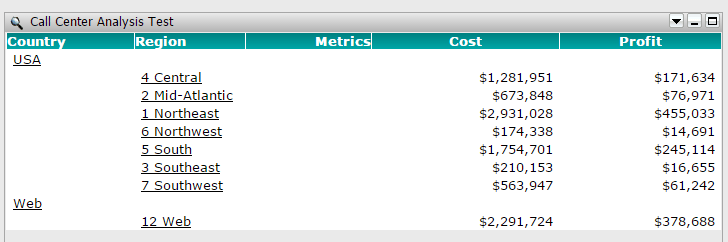
ka04W000000Oca6QAC_0EM4400000025t2.jpeg

In Excel:

ka04W000000Oca6QAC_0EM4400000025t8.jpeg

Notice how the grid's title bar is also misplaced in the middle-right.
 
CAUSE:
This is a known issue with Strategy Web 9.4.1.
 
ACTION:
This issue has been fixed with Strategy 10. Upgrade in order to take advantage of the fix.
 
WORKAROUND:
If possible, disable outline mode from the grid.


Comment

0 comments

Details

Knowledge Article

Published:

May 1, 2017

Last Updated:

May 1, 2017