EducationSoftwareStrategy.com
StrategyCommunity

Knowledge Base

Product

Community

Knowledge Base

TopicsBrowse ArticlesDeveloper Zone

Product

Download SoftwareProduct DocumentationSecurity Hub

Education

Tutorial VideosSolution GalleryEducation courses

Community

GuidelinesGrandmastersEvents
x_social-icon_white.svglinkedin_social-icon_white.svg
Strategy logoCommunity

© Strategy Inc. All Rights Reserved.

LegalTerms of UsePrivacy Policy
  1. Home
  2. Topics

KB214466: "Specified driver could not be loaded" error shows when opening the Warehouse Catalog in Red Hat Linux 7 using a Vertica driver.


Community Admin

• Strategy


This document describes an issue that makes the "[DataDirect][ODBC lib] Specified driver could not be loaded" error appear. This happened using a Vertica driver in a Red Hat Linux 7 environment.

SUMMARY:
This document describes an issue that makes the "[DataDirect][ODBC lib] Specified driver could not be loaded" error appear. This happened using a Vertica driver in a Red Hat Linux 7 environment.
 
SYMPTOM:
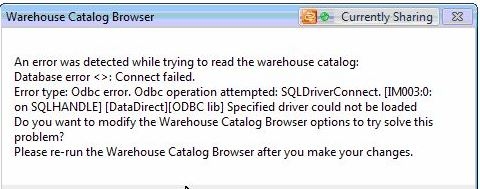
After creating a Vertica DSN and creating a new project using a Database instance that points to this DSN, the user tries to open the Warehouse Catalog and gets the following error:
ka04W000000OgmaQAC_0EM440000002CDH.jpeg

Error Message


Error type: Odbc error. Odbc operation attempted: SQLDriverConnect. [IM003:0: on SQLHANDLE][DataDirect][ODBC lib] Specified driver could not be loaded.  Do you want to modify the Warehouse Catalog Browser options to try solve this problem? 
Please re-run the Warehouse Catalog Browser after you make your changes.

 
CAUSE:
In this specific case, the driver that was being used for the creation of the DSN that the Database Instance was using was a 64-bit driver, which is not supported.
 
ACTION:
Since the only supported driver is the 32-bit version, the only solution is the install the 32-bit Vertica driver in Linux.


Comment

0 comments

Details

Knowledge Article

Published:

June 9, 2017

Last Updated:

June 9, 2017