EducationSoftwareStrategy.com
StrategyCommunity

Knowledge Base

Product

Community

Knowledge Base

TopicsBrowse ArticlesDeveloper Zone

Product

Download SoftwareProduct DocumentationSecurity Hub

Education

Tutorial VideosSolution GalleryEducation courses

Community

GuidelinesGrandmastersEvents
x_social-icon_white.svglinkedin_social-icon_white.svg
Strategy logoCommunity

© Strategy Inc. All Rights Reserved.

LegalTerms of UsePrivacy Policy
  1. Home
  2. Topics

KB215448: A user cannot drag and drop an attribute in a report grid in Web, even if they have the ‘Web Pivot Report’ privilege assigned in MicroStrategy Web 9.4.1 and above.


Community Admin

• Strategy


A user cannot drag and drop an attribute in a report grid in Web, even if they have the ‘Web Pivot Report’ privilege assigned in MicroStrategy 9.4.1 and above.

SUMMARY:
This document explains a possible reason why a user may not be able to drag and drop attributes in a report in Strategy Web 9.4.x, even if the user has the 'Web Report Privilege' assigned.
 
SYMPTOM:
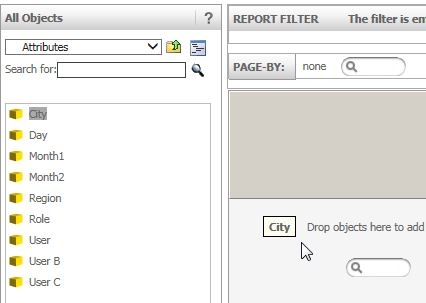
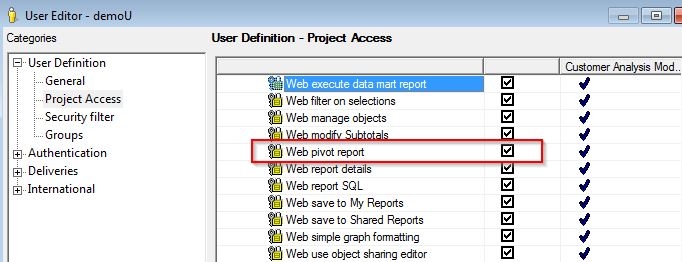
After creating a new report in Strategy Web 9.4.x, the user cannot drag and drop an attribute on it, even if he has the 'Web Pivot Report' privilege assigned.
ka04W000000OhkOQAS_0EM4400000025si.jpeg
ka04W000000OhkOQAS_0EM4400000025sk.jpeg

 
This user will also not be able to right-click on the attribute to add the object to the grid either. 
 
CAUSE:
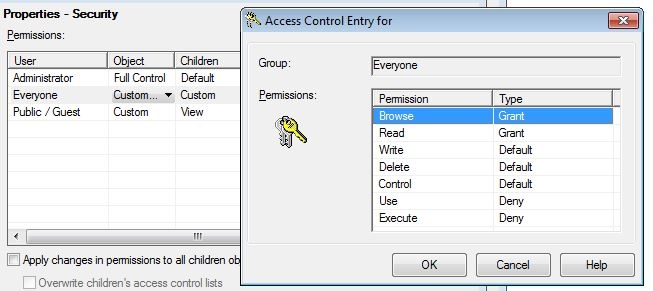
In this specific case, the ACL list for the project was set as ‘Custom’ for the ‘Everyone’ group and had the Use and Execute permissions set to ‘Deny’.
ka04W000000OhkOQAS_0EM4400000025sg.jpeg

 
ACTION:

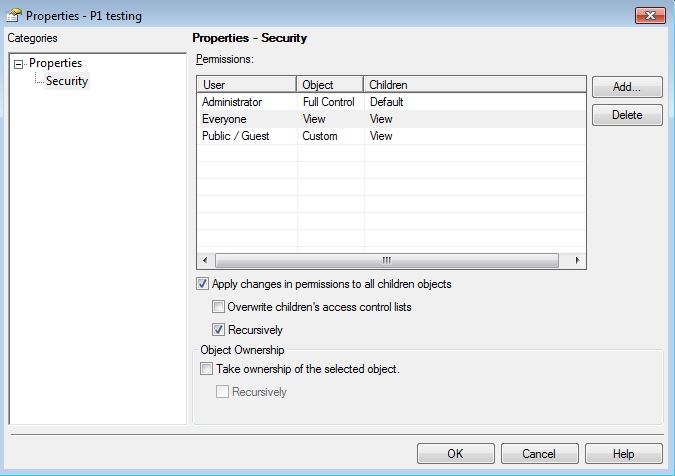
  1. Right click the project being used and select Project Configuration Security – Set project root folder security and then select Modify.
  2. Set the ACL Security for the ‘Everyone’ group as ‘View’ and check the ‘Apply changes in permissions to all children objects’ and ‘Recursively’.
ka04W000000OhkOQAS_0EM4400000025sm.jpeg

Comment

0 comments

Details

Knowledge Article

Published:

April 17, 2017

Last Updated:

April 17, 2017