EducationSoftwareStrategy.com
StrategyCommunity

Knowledge Base

Product

Community

Knowledge Base

TopicsBrowse ArticlesDeveloper Zone

Product

Download SoftwareProduct DocumentationSecurity Hub

Education

Tutorial VideosSolution GalleryEducation courses

Community

GuidelinesGrandmastersEvents
x_social-icon_white.svglinkedin_social-icon_white.svg
Strategy logoCommunity

© Strategy Inc. All Rights Reserved.

LegalTerms of UsePrivacy Policy
  1. Home
  2. Topics

KB215812: How to send a MicroStrategy Web virtual directory to MicroStrategy Technical Support to troubleshoot MicroStrategy Web related issues.


Community Admin

• Strategy


This article describes how to both send a MicroStrategy Web virtual directory to MicroStrategy Technical Support and restore a MicroStrategy Web virtual directory.

This article is intended as a guide on how to send a virtual directory to Strategy Technical Support for further analysis. When troubleshooting an issue related to Strategy Web, Strategy Technical Support may request the virtual directory to test the issue in house. This will allow Technical Support to determine whether the issue is related to the Strategy Web application files, or the application server, network, or other environmental component. This analysis can be invaluable in narrowing down the cause of a particular issue, as if the issue travels along with the Strategy Web files, it can be concluded that the issue is caused by Strategy, but if it doesn't the culprit may be within the third-party components that interact with it.
The steps to follow will vary slightly for the asp version or the jsp version of the application, but both of these will be covered in this guide. Listed below are the steps to follow.
 

  1. Locate the Virtual Directory.
    A) ASP
        i) Note the web server machine's processor type
    B) JSP
  2. Compress the folder into a .zip file.
    A) Deleting the log files.
  3. Send the .zip file to Strategy Technical Support.
  4. How to restore it.
    A) ASP
    B) JSP


  • Locate the Virtual Directory

    The location of the virtual directory will depend on what version of the application is used (asp or jsp) as well as the application server that is used to deploy Strategy Web.

    A) ASP:
    When using the asp version of the Strategy Web application, the virtual directory will be located, by default, in the Strategy installation folder. This folder has a file path as shown below (or similar) unless the installation directory was modified during installation.

    "C:\Program Files (x86)\Strategy\"

    Inside the Strategy folder, there is a "Web ASPx" folder as shown below. This folder and all of its contents are the virtual directory.
      i) Note the web server machine's processor type
    For the ASP version, it is also important to note if the system is a 32-bit or 64-bit processor. Follow these steps to take note of which version the system is on:
    1. Click the Start menu.
    2. Right click on Computer.
    3. Select "Properties".
    4. Under "System", the System type will show up as either "32-bit Operating System" or "64-bit Operating System".
    5. Write this information down.

    B) JSP:
    When using the jsp version of the Strategy Web application, the virtual directory location is dependent on the application server that is used to deploy the application. For example, when using Tomcat, there will be a webapps folder in the tomcat installation. This folder has a file path as shown below (or similar) unless the installation directory is modified during installation.

    "C:\Program Files\Apache Software Foundation\Tomcat 6.0\webapps\"

    Inside the webapps folder, there is a folder named, by default, with the same name as the Strategy *.war file at the time it was deployed. In the example shown below the application is titled "Strategy". This folder and all of its contents are the virtual directory.


  • Compress the Folder into a ".zip" file

    Now that the necessary files have been located, in order to send the entire folder to Strategy Technical Support, it should first be compressed into a single file that can then be sent via ftp or uploaded to the customer folder.

    To prevent problems related to compressing files that are in use by the application server, first copy the directory to a different location.

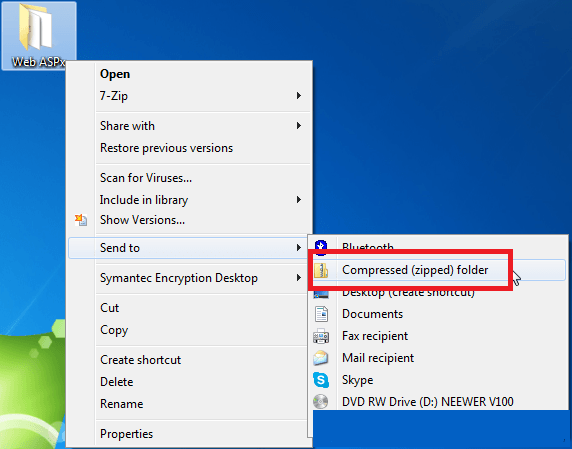
    There are several third party applications that will perform the zip compression. On a Microsoft Windows machine, Windows can compress the folder by right-clicking the folder and selecting "Send To: > Compressed File", as shown below.
ka04W00000148wUQAQ_0EM4400000025sz.jpeg
  • A) Deleting the log files.
    Generally, after it has been compressed, the .zip file will be around 150MB in size. If the .zip file is much larger than this, then the log files in the .zip file should be deleted before sending it. The log files are not required in order to properly restore the virtual directory.

    To delete the log files, follow these steps:
    1. Open the .zip file.
    2. Navigate to the WEB_INF\log folder.
    3. Delete the contents of this folder.
     
  • Send the .zip file to Strategy Technical Support.

    The zip file can now be sent to Strategy Technical Support. When sending the file, if it is the asp virtual directory also inform the engineer if the system type is 32-bit or 64-bit. If the file is at around a general file size, it should be able to upload to the customer folder at:

    https://resource.microstrategy.com/Support/MainSearch.aspx
     
  • Below are the steps to restore the virtual directory. A) ASP Note: When restoring the virtual directory take note if the original machine was a 32 bit or 64 bit machine and the exact Strategy release and update. The machine on which the virtual directory is being restored must be the same as the original machine.
     
  • Unzip the .zip file to a known location.
  • Open Microsoft IIS and create a new application pool by right-clicking "Application Pools"  > "Add Application Pool..." 
  • Give the Application Pool a meaningful name.
  • For the ".NET Framework version" choose the version of .Net that is supported by the version of Strategy being restored. This information can be found in the Readme.
    For version 9.3.0 or later, select ".NET Framework v4.0.30319". 
    For earlier versions, select ".NET Framework v2.0.50727".
  • Leave the Managed pipeline mode as "Integrated".
  • Right-click "Default Web Site" > "Add Application".
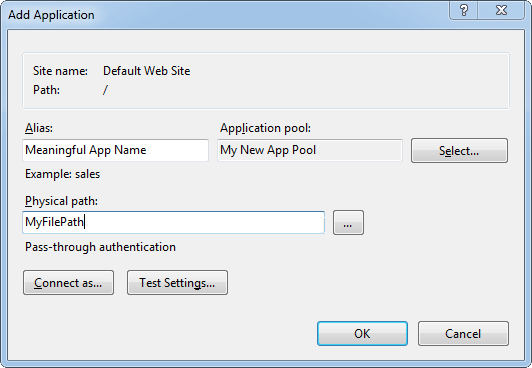
  • In the window that appears, give the application an alias. This can be any name.
  • Click the ellipsis button next to "Physical Path", and browse to the folder where the .zip file was extracted.
  • Use the "Select" button next to "Application pool" to select the application pool that was just created. A screenshot of the window for these three settings is shown below.
ka04W00000148wUQAQ_0EM4400000025t1.jpeg
  • Click OK.
  • Left-click on the newly created application under Default Web Sites.
  • Double click on the "Authentication" icon.
  • Enable Anonymous authentication and disable all other modes.
  • Right click on the newly created application under Default Web Sites > "Edit Permissions".
  • Access the "Security" tab.
  • Click "Edit". Click "Add".
  • Click "Locations...", scroll all the way up, and select the web server machine name.
  • Enter "IUSR" into the user locator box and click "Check Names". 
  • Click OK twice to return to the Security tab, as per step 15.
  • Click "Edit". Click "Add" again
  • Enter "Everyone" into the user locator box and click "Check Names". 
  • Click OK twice to return to the Security tab, as per step 15.
  • Click "Advanced", click "Change Permissions".
  • Enable the box "Replace all child object permissions with inheritable permissions from this object".
  • Click OK until all the windows have been closed.
  • Restart Microsoft IIS.

The application can now be accessed at the following url: 


http://<ServerName>/<Alias>/asp/Main.aspx.

B) JSP:
Note: This example is specific to Tomcat. Since the *.war file is independent of the operating system and application server, all JSP issues can be tested in a Windows and Tomcat environment. 

  1. Unzip the .zip file to a known location.
  2. Find the "webapps" folder.
    In Tomcat, this is similar to where they were found in step 1.
  3. Give the top folder of the virtual directory a different name than any existing applications in this folder.
  4. Place the folder inside the webapps folder. 
  5. Restart the application server. Tomcat will load the new virtual directory as a new application upon restarting.

The application can now be accessed at the following url:


http://<ServerName>:<PortNumber>/ApplicationName/servlet/mstrWeb

 
Third Party Software Installation WARNING
The third-party product(s) discussed in this technical note is manufactured by vendors independent of Strategy. Strategy makes no warranty, express, implied or otherwise, regarding this product, including its performance or reliability.


Comment

0 comments

Details

Knowledge Article

Published:

April 4, 2017

Last Updated:

February 13, 2018