EducationSoftwareStrategy.com
StrategyCommunity

Knowledge Base

Product

Community

Knowledge Base

TopicsBrowse ArticlesDeveloper Zone

Product

Download SoftwareProduct DocumentationSecurity Hub

Education

Tutorial VideosSolution GalleryEducation courses

Community

GuidelinesGrandmastersEvents
x_social-icon_white.svglinkedin_social-icon_white.svg
Strategy logoCommunity

© Strategy Inc. All Rights Reserved.

LegalTerms of UsePrivacy Policy
  1. Home
  2. Topics

KB215916: Where can email address be configured in Health Center to receive notifications in MicroStrategy Analytics Enterprise 9.4.x-10.x?


Community Admin

• Strategy


This knowledge base article explains where email addresses can be configured in Health Center to receive notifications in MicroStrategy Analytics Enterprise 9.4.x-10.x.

SUMMARY:
This document explains what kind of notifications administrators can receive in a Health Center System and how to configure them, in Strategy Analytics Enterprise 9.4.x-10.x.
 
QUESTION:
What kind of notications can be sent in a Health Center System?
 
ANSWER:
Email addresses to receive notifications can be added in two different places, in Strategy Health center 9.4.x-10.x:
1. Health Center Console. System Checks can be scheduled to be run at a specific time, daily or weekly. One ot more email addresses can be added to notify administrators that a system check could not run properly or that an error has been detected, as shown below:
 

ka04W000000Ofk7QAC_0EM4400000029K1.jpeg

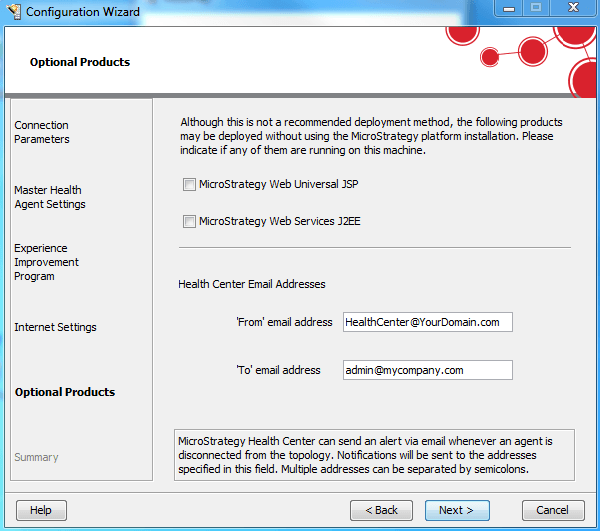
2. Strategy Configuration Wizard. When configuring a Master Health Agent, one can enter:
     - 'From' email address: it is the address that will appear in the 'From' section of Health Center notification emails, when a system check fails.
     - 'To' email address: it is the address or addresses where Health Center notifications will be sent to. 
 

ka04W000000Ofk7QAC_0EM4400000029K3.jpeg

Comment

0 comments

Details

Knowledge Article

Published:

June 9, 2017

Last Updated:

February 28, 2018