EducationSoftwareStrategy.com
StrategyCommunity

Knowledge Base

Product

Community

Knowledge Base

TopicsBrowse ArticlesDeveloper Zone

Product

Download SoftwareProduct DocumentationSecurity Hub

Education

Tutorial VideosSolution GalleryEducation courses

Community

GuidelinesGrandmastersEvents
x_social-icon_white.svglinkedin_social-icon_white.svg
Strategy logoCommunity

© Strategy Inc. All Rights Reserved.

LegalTerms of UsePrivacy Policy
  1. Home
  2. Topics

KB216371: Groups/Users granted security filters through Command Manager 9.4.x - 10.x are not displayed with "LIST ALL PROPERTIES FOR PROJECT CONFIGURATION IN PROJECT" script.


Community Admin

• Strategy


This technical note outlines an issue where Groups/Users granted security filters through Command Manager are not displayed with the "LIST ALL PROPERTIES FOR PROJECT CONFIGURATION IN PROJECT" script.

SYMPTOM:
In Strategy Command Manager 9.4.x, Groups/Users granted security filters through Command Manager are not displayed with the "LIST ALL PROPERTIES FOR PROJECT CONFIGURATION IN PROJECT" script.
 
STEPS TO REPRODUCE:
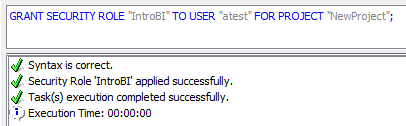
  • Grant the security role to a user.
ka04W000000OcZJQA0_0EM440000002CDA.jpeg
  • 
    GRANT SECURITY ROLE "IntroBI" TO USER "atest" FOR PROJECT "NewProject";
    
    Syntax is correct.
    Security Role 'IntroBI' applied successfully.
    Task(s) execution completed successfully.
    Execution Time: 00:00:00
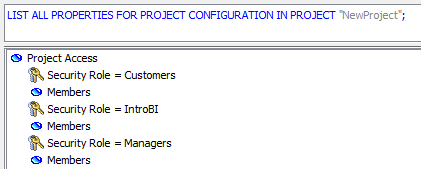


  • List the properties of the Project Configuration. Note that the user ‘atest’ added in Step_1 is not displayed under the ‘IntroBI’ security role, as shown in the image below:
ka04W000000OcZJQA0_0EM440000002CD8.jpeg
  • 
    LIST ALL PROPERTIES FOR PROJECT CONFIGURATION IN PROJECT "NewProject";
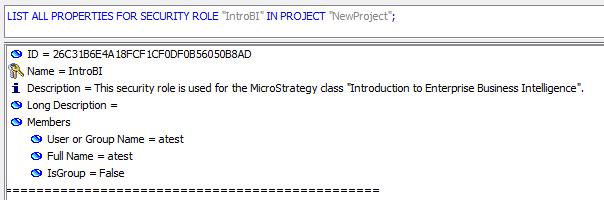
     
  • The user is displayed when listing the properties of the security role.
ka04W000000OcZJQA0_0EM440000002CDB.jpeg
  • 
    LIST ALL PROPERTIES FOR SECURITY ROLE "IntroBI" IN PROJECT "NewProject";
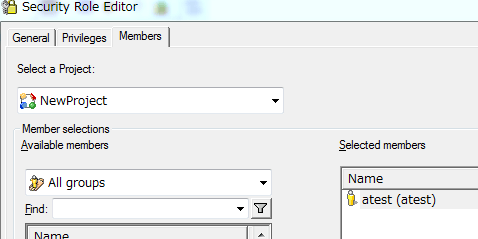
     
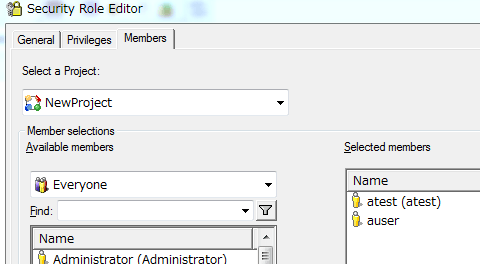
  • The user is displayed in the Security Role Editor in Strategy Developer:
ka04W000000OcZJQA0_0EM440000002CDI.jpeg
  • Add a user  using the Security Role Editor in Strategy Developer:
ka04W000000OcZJQA0_0EM440000002CDJ.jpeg
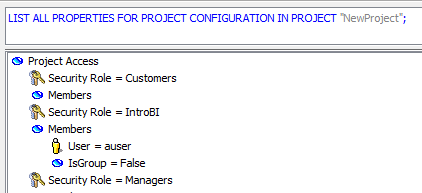
  • Note that the user, ‘auser’ added through Strategy Developer, is displayed in the propeties of the Project Configuration, as shown in the image below:
ka04W000000OcZJQA0_0EM440000002CD9.jpeg

CAUSE:
This is a known issue with Strategy Command Manager 9.4.x - 10.x.
 
ACTION:
Currently this issue is being reviewed by Strategy for a potential code fix on an upcoming Strategy release.


Comment

0 comments

Details

Knowledge Article

Published:

May 10, 2017

Last Updated:

May 10, 2017